@clawdbuilder/jig-bedrock
Claude on AWS Bedrock for Pi: inference-profile discovery, the Messages route with cache-friendly tools, Converse fallback, SSO repair and a budget footer.
Package details
Install @clawdbuilder/jig-bedrock from npm and Pi will load the resources declared by the package manifest.
$ pi install npm:@clawdbuilder/jig-bedrock- Package
@clawdbuilder/jig-bedrock- Version
0.4.2- Published
- Nov 13, 2026
- Downloads
- 2,928/mo · 2,928/wk
- Author
- clawdbuilder
- License
- MIT
- Types
- extension
- Size
- 440.3 KB
- Dependencies
- 1 dependency · 2 peers
Pi manifest JSON
{
  "extensions": [
    "index.ts"
  ]
}
Security note
Pi packages can execute code and influence agent behavior. Review the source before installing third-party packages.
README
jig-bedrock
Claude on AWS Bedrock for Pi, using your AWS profile.
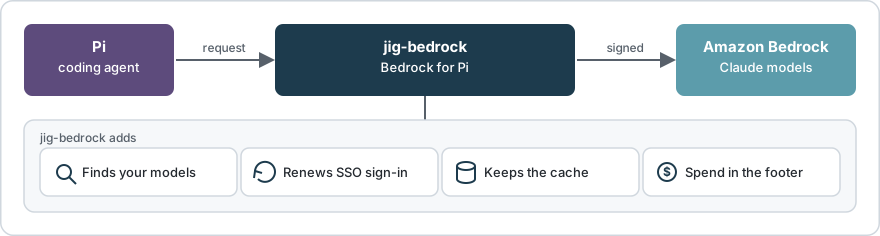
jig-bedrock between Pi and Bedrock: models, routes, sign-in, spend.
Why use it
- After a tool loads: 275 tokens written to the cache, not 34,463.
- Lists your account's Claude models; your team's application inference profiles may hold other models too.
- An expired SSO sign-in renews; the request is sent once more.
- Spend and budget in the footer.
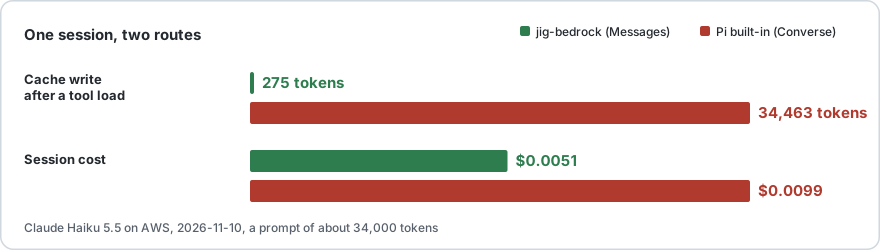
Measured on AWS on 2026-11-10: Claude Haiku 5.5, a prompt of about 34,000 tokens. Cache details.
Set up

Four steps; settings in Settings, checks in Commands.
You need: Node 22.19+, Pi 1.5 or later, AWS CLI v2, an AWS profile that can call Bedrock.
1. Install
pi install npm:@clawdbuilder/jig-bedrockUsing Jig? jig install npm:@clawdbuilder/jig-bedrock; then use jig wherever these steps say pi.
Done when pi list or jig list shows npm:@clawdbuilder/jig-bedrock.
2. Sign in
Run /login, choose Sign in with an API key, then Amazon Bedrock (jig-bedrock); it asks for no key, and the next screens pick an AWS profile and the models.
How do you sign in to AWS?
→ An AWS profile that already works
  Create an IAM Identity Center (SSO) profile
  Create an IAM role profile
  Use the AWS credential chain (no profile)
  Use a Bedrock API key with Pi's own provider
Which AWS profile should Bedrock use?
→ my-profile
Which inference profiles should Bedrock list?
→ All AWS-defined Claude inference profiles
AWS regions for discovery (comma separated)
> us-east-1
Bedrock models loaded: 31. Choose one with /model.Pi then says in red that no default model is configured; step 3 picks one.
Done when the last line is Bedrock models loaded: with a number above 0.
3. Pick a model
Run /model, type sonnet-5-5, choose with the arrow keys and Enter.
> sonnet-5-5
→ claude-sonnet-5-5-global [jig-bedrock]
  claude-sonnet-5-5 [jig-bedrock]
  Model Name: Claude Sonnet 5.5 · global
A -global id lets AWS serve the request from any region; same model, same price (Model ids).
Done when the footer shows the chosen id and Nov $0.00.
4. Check
/bedrock doctorBedrock doctor
✓ Node 26.13.0
✓ AWS CLI 2.34.46
✓ Settings: ~/.pi/agent/bedrock.json
✓ AWS profile: my-profile (from /login)
✓ Sign-in: AWS answered
✓ Models: 31 found in us-east-1 (AWS-defined)
✓ Selected model: claude-sonnet-5-5 · Messages route
– Spend command: not set
Bedrock is ready.Done when the last line is Bedrock is ready.
Budget
/bedrock budget 200Nov $12.40 / $200; warning at 80%, error at 100%. Spend details; prompt cache.
Compared with Pi's built-in Bedrock provider
| Pi built-in | jig-bedrock | |
|---|---|---|
| Install | Part of Pi | pi install |
| Sign-in | API key or environment | AWS profile: SSO, keys, role |
| Models | Pi's list, non-Claude too | Claude; others by application inference profile |
| Expired SSO sign-in | Request fails | Renewed, sent once more |
| Cache after a tool load | Rewritten | Kept on four Claude models |
| 1-hour cache | Claude 4.5 and later | Converse models only |
| Spend and budget | Not included | In the footer |
Several AWS profiles
Presets are named settings.
{
    "presets": {
        "work": { "profile": "company-profile", "team": "my-team", "monthlyBudgetUsd": 200 },
        "personal": { "profile": "my-profile", "regions": ["us-west-2"] }
    },
    "preset": "work"
}
/bedrock use lists them. /bedrock use personal switches this session; a fresh saved list loads at once, otherwise the models are read in the background. /bedrock preset add work saves the current sign-in as a preset. In a second terminal, JIG_BEDROCK_PRESET=work pi gives it its own list and spend.
Commands
| Command | What it does |
|---|---|
/bedrock status |
Profile, sign-in, models, spend. |
/bedrock doctor |
Checks; one next step. |
/bedrock models |
Models, route, price. |
/bedrock refresh |
Reads models now, any cache age. |
/bedrock login |
Renews the AWS sign-in. |
/bedrock usage |
Spend by model and period. |
/bedrock use |
List or switch presets. |
/bedrock help lists every command, including settings, set and budget.
When something is wrong
| You see | Run |
|---|---|
| Sign-in expired | /bedrock login |
| Access denied | /bedrock doctor |
No models in /model |
/bedrock refresh |
| A model is missing after an update | /bedrock models |
| The footer shows no amount | /bedrock usage |
Limits
- Linux/WSL tested. macOS: unit tests in CI, not run against real AWS. No native Windows.
- A Bedrock API key works through Pi's built-in provider, not this one.
- Spend counts this machine's Pi sessions, unless a
spendCommandis set. - The budget is a figure to compare with; it never blocks a request.
- Only SSO sign-ins are renewed.
Update and uninstall
Update: pi update npm:@clawdbuilder/jig-bedrock, then /reload.
Remove: /logout, then pi remove npm:@clawdbuilder/jig-bedrock. It leaves some files: Files on disk.
With Jig, jig update updates jig-bedrock (it is installed unpinned) and jig remove npm:@clawdbuilder/jig-bedrock removes it.
More detail
| Page | Read it when |
|---|---|
| How it works | Routes and ids. |
| Settings | Edit bedrock.json. |
| Troubleshooting | A command fails. |
| Spend command | You set spendCommand. |
For an agent setting this up
Do the four steps in order. Step 2 opens a browser: ask the user to finish. Never read or print credentials. Done when the doctor says Bedrock is ready.
Licence
MIT.