@davisliu2006/pi-permission-system
Permission enforcement extension for the Pi coding agent.
Package details
Install @davisliu2006/pi-permission-system from npm and Pi will load the resources declared by the package manifest.
$ pi install npm:@davisliu2006/pi-permission-system- Package
@davisliu2006/pi-permission-system- Version
0.4.0- Published
- Nov 12, 2026
- Downloads
- 660/mo · 459/wk
- Author
- davisliu2006
- License
- MIT
- Types
- extension
- Size
- 76.9 KB
- Dependencies
- 0 dependencies · 3 peers
Pi manifest JSON
{
  "image": "https://raw.githubusercontent.com/davisliu2006/pi-permission-system/main/images/image.webp",
  "extensions": [
    "./index.ts"
  ]
}
Security note
Pi packages can execute code and influence agent behavior. Review the source before installing third-party packages.
README
pi-permission-system
Permissions management for the pi coding agent.
Roughly based on MasuRii/pi-permission-system.
Key Features
- Bash splitting. Splits chained commands (eg.
cd ~ && pwd) into parts and matches rules for each segment. - AI-generated request purpose and bash rule wildcard.
- Experimental auto-classifier. Supports configurable auto-allow critera.
Permissions Overview
A permission can be one of the following:
"allow"  // allows the action
"auto"   // uses an AI classifier to choose between allow and ask
"ask"    // asks the user for permission
"deny"   // automatically denies the action
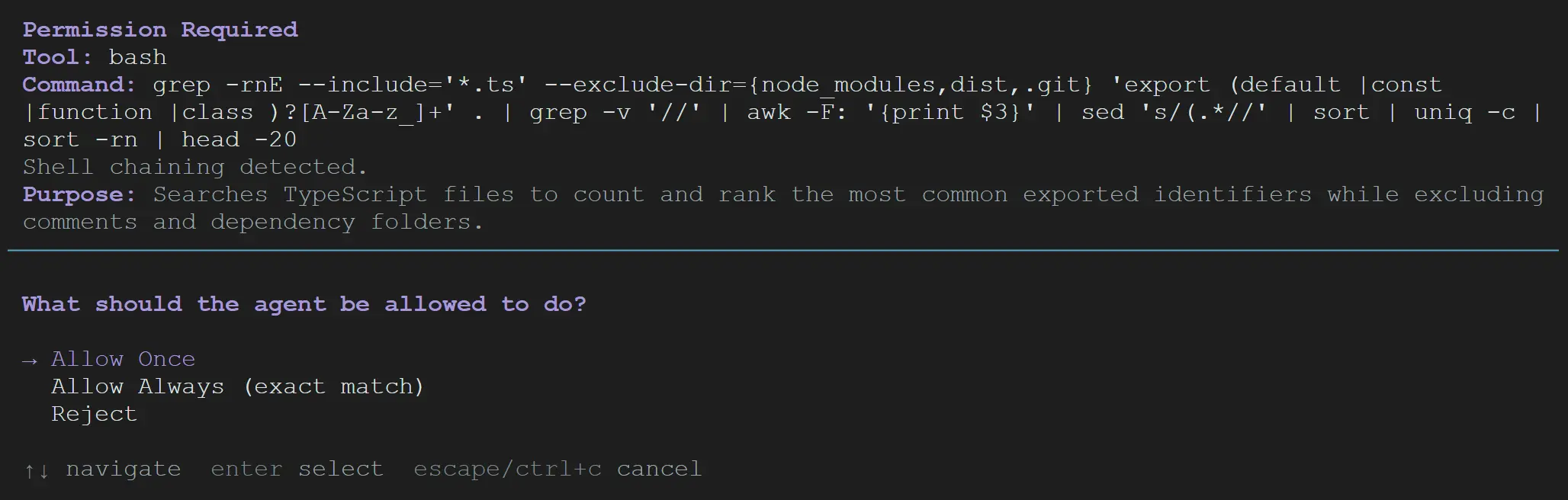
Ask states the purpose of the request and gives the following options:
Allow Once
Allow Always
Reject
"Reject" stops the current agent task and asks the user what to do next.
"Allow always" is persisted for the session only. It uses an AI-generated command wildcard for bash and an exact match for other tools.
Configuration
The supported top-level keys are: default, tools, bash, external_directory, and settings.
bash body matching supports wildcard:
*matches any sequence and?matches one character\*and\?are match literal*and?
tools matches exact tool names.
The builtin path tools in pi are: read, write, edit, find, grep, ls. external_directory overrides the settings for these path tools. The primary use is to override write and edit to a stronger policy for external directories.
settings holds optional non-permission settings.
Rule Precedence
More specific rules override less specific rules:
tools.*overridesdefaultbash.*overridestools.bash- Within
bash, the last match wins
Global Configuration
Located in ~/.pi/agent/pi-permissions.jsonc.
Example:
{
    "default": "ask",
    "tools": {
        "read": "allow",
        "write": "allow",
        "edit": "allow",
        "find": "allow",
        "grep": "allow",
        "ls": "allow",
        "bash": "ask",

        // add any non builtin tools
        "mcp": "ask"
    },
    "bash": {
        "git status*": "allow",
        "git log*": "allow",
        "git diff*": "allow",
        "git branch*": "allow",
        "git show*": "allow",

        "ls*": "allow",
        "pwd": "allow",
        "find*": "allow",
        "tree*": "allow",
        "cat*": "allow",
        "head*": "allow",
        "tail*": "allow",
        "wc*": "allow",
        "echo*": "allow",
        "sed*": "allow",

        "grep*": "allow",
        "rg*": "allow"
    },
    "external_directory": {
        "write": "ask",
        "edit": "ask"
    }
}
Local Configuration
Located in the local Pi config folder:
<project-root>/.pi/pi-permissions.jsonc
Local configuration overrides global configuration, including deny rules.
Set settings.ignore_global to true in the local config to ignore global permission sections entirely.
Optional Settings
{
    "settings": {
        "ignore_global": true,
        "ai_model": "provider/model-id",
        "auto_allow_criteria": "read-only or easily reversible"
    }
}
ignore_global: boolean: Skips global permission sections if placed in a local config. Has no effect if placed in a global config.ai_model: string: Overrides the model used for helper completions.auto_allow_criteria: string: Specify the auto-classifer criteria. Defaults to"read-only or easily reversible".
"Allow Always" Matching
Matching is done as (tool, body).
Body content:
- For built-in path tools, it is the path
- For bash, it is the command
- For other tools, it is a stable JSON serialization of the full input
Body matching rules:
- For non-bash, it is exact match
- Bash supports wildcard matching
Bash Matching Safeguards
Bash matching safeguards against unsafe shell syntax.
Sequences separated by ;, &&, ||, or newlines are split and each segment is matched against bash rules. The strictest result wins (deny > ask > auto > allow).
If a command contains other chaining (|, &, command/process substitution, or parentheses), bash pattern rules for allow are skipped, allowing other segments to take priority and successively falling back to tools.bash and default.
"Allow always" for complex sequences saves the exact command, not a wildcard.