@fradser/pi-magpie
Pi provider for the magpie gateway: every magpie model and routing group in Pi's model list, refreshed from magpie's live catalog
Package details
Install @fradser/pi-magpie from npm and Pi will load the resources declared by the package manifest.
$ pi install npm:@fradser/pi-magpie- Package
@fradser/pi-magpie- Version
0.4.0- Published
- Nov 12, 2026
- Downloads
- 635/mo · 27/wk
- Author
- fradser
- License
- MIT
- Types
- extension
- Size
- 95.6 KB
- Dependencies
- 0 dependencies · 2 peers
Pi manifest JSON
{
  "extensions": [
    "./index.ts"
  ]
}
Security note
Pi packages can execute code and influence agent behavior. Review the source before installing third-party packages.
README
@fradser/pi-magpie
Every magpie model and routing group in Pi's model list, refreshed from magpie's live catalog, with magpie's effective prices.
magpie itself already wires Pi: picking a model there writes that model into
~/.pi/agent/models.json under a magpie provider. This extension goes one step
further — it registers the whole catalog served by the gateway
(GET /v1/models), so a model or routing group added, renamed or removed in
magpie appears in Pi without editing models.json.
Requirements
A running magpie gateway and its key. Nothing else.
Install
pi install npm:@fradser/pi-magpieConfigure
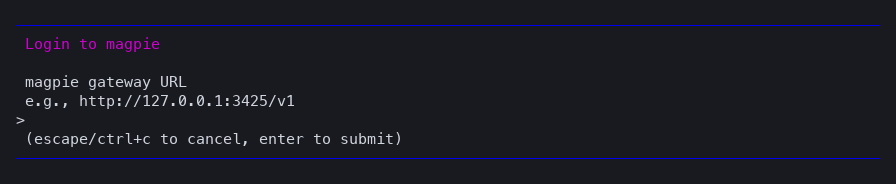
Run /login magpie. It asks for two things and proves both before saving:
- Gateway URL — press Enter for
http://127.0.0.1:3425/v1, or type the address magpie runs on. A bare10.10.0.195:3425works: thehttp://scheme and the/v1prefix are added for you. An address that already has a path is kept as typed. - Gateway key — the second prompt names the gateway it will be checked against.
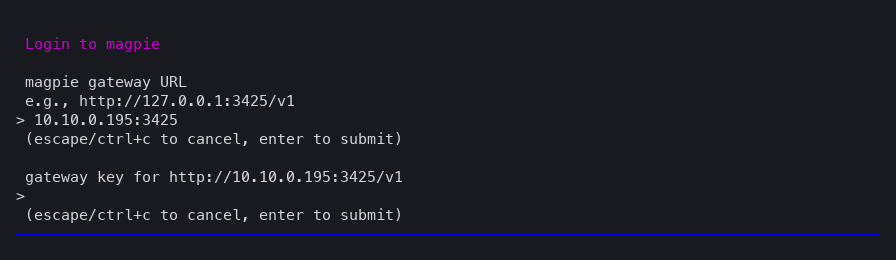
Pi then requests the catalog once. If the key is refused or the gateway is unreachable, the login reports it and saves nothing — so a wrong URL shows up immediately instead of as a timeout on your first turn.

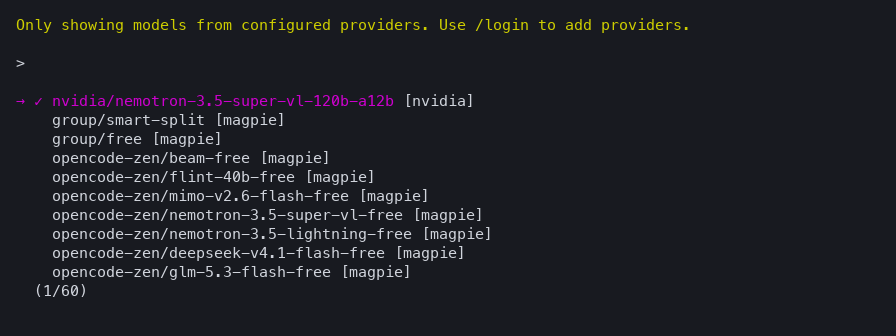
After that the models are in Pi's picker, and every turn goes to the gateway you logged in to:
The address is stored with the key in ~/.pi/agent/auth.json, so nothing needs
to be exported afterwards:
{ "magpie": { "type": "api_key", "key": "saved by /login", "env": { "MAGPIE_BASE_URL": "http://10.10.0.195:3425/v1" } } }/logout magpie removes it.
Environment instead of /login
For CI or a shared machine, skip /login and export:
| Variable | Meaning |
|---|---|
MAGPIE_API_KEY |
Gateway key. |
MAGPIE_BASE_URL |
Gateway origin, e.g. http://10.10.0.195:3425/v1. Default http://127.0.0.1:3425/v1. |
MAGPIE_PI_MODELS |
Comma-separated globs of model ids to expose, e.g. group/*. Unset lists everything. |
A stored credential wins over the environment for the key, and a gateway saved
by /login wins over both MAGPIE_BASE_URL and models.json.
Why address precedence matters
Pi applies models.json above an extension per model, so a baseUrl there is
the one requests use. The extension therefore never invents a gateway: it
only overrides the address when /login stored one, or models.json/the
environment supplied one. Anything else would redirect traffic away from the
gateway you configured — which is exactly what happened when a saved key was
paired with a models.json gateway and the provider assumed 127.0.0.1.
Each of these works on its own:
| Configuration | Gateway from | Key from |
|---|---|---|
/login magpie only |
saved with the credential | saved with the credential |
models.json only, no models array |
baseUrl there |
apiKey there (literal, $VAR, or !cmd) |
| Environment only | MAGPIE_BASE_URL (default 127.0.0.1:3425/v1) |
MAGPIE_API_KEY |
They also combine: a models.json gateway with a /login key works, since the
key and the address are resolved independently.
How the catalog updates
- At session start the extension asks Pi to refresh
magpieover the network, at most once every five minutes per process. - A successful refresh is persisted by Pi, so an offline start still lists the last known catalog.
- An error, a non-2xx answer or an empty catalog keeps the previous list.
pi update --modelsforces a refresh on demand.
Thinking levels follow the efforts magpie reports per model, and off stays
unsupported because magpie exposes no per-request way to disable thinking.
Pricing
The catalog request carries X-Magpie-Prices: 1, so magpie answers with
magpie_price for every model it can price: its effective price, after your
custom prices, catalog prices such as models.dev, and the multipliers that apply.
Pi's cost fields take those numbers directly — both are USD per million tokens
— so /cost, the footer and any cost ledger reflect what the gateway charges
rather than a vendor list price.
A model magpie has no price for keeps zero, and so does a routing group whose
members have different prices: magpie reports no single price for it, and
borrowing a member's would be wrong. group/* entries therefore bill as free in
Pi's figures.
models.json still wins per model. magpie's own models entries there carry
base prices, and those mask the effective ones — on one observed Bailian model by
about 17×. To bill from magpie's numbers, leave the magpie provider in
models.json without a models array, or pin exact prices in modelOverrides,
which applies above everything else.
Run Pi in a container
The gateway just needs an address the container can route to. On Docker Desktop
for macOS, containers reach 10.10.0.1 and the internet but not other LAN hosts,
so a gateway on a NAS needs the host to forward it:
# on the host: forward 13425 to the gateway (any streaming TCP proxy)
node -e 'const http=require("node:http");http.createServer((q,s)=>{const u=http.request("http://10.10.0.195:3425"+q.url,{method:q.method,headers:{...q.headers,host:"10.10.0.195:3425"}},r=>{s.writeHead(r.statusCode,r.headers);r.pipe(s)});q.pipe(u)}).listen(13425,"0.0.0.0")'
Then run /login magpie in the container and answer
http://host.docker.internal:13425/v1. Catalog, model selection, streaming,
retries and error text all work through that path; verified inside
node:24-bookworm-slim with pi 1.4.0, including a cold start (seeded catalog),
a streamed turn, an upstream 429 passed through unchanged, and an offline start
restoring the persisted catalog.
Troubleshooting
| Symptom | Cause |
|---|---|
/login magpie reports an HTTP status |
Wrong key, or the URL is not magpie's gateway. Nothing was saved. |
| No magpie models at all | Nothing configured: run /login magpie, or set MAGPIE_API_KEY plus a gateway. pi auth check --provider magpie reports ready or not_ready. |
| Worked only after a new shell | An older version made a saved key imply 127.0.0.1, overriding the gateway in models.json. Upgrade: the key and the address are now independent. |
| Costs are zero | magpie reported no price for that model, or a models array in models.json overrides the live one. |