@malarstrom/gatewarden
Give a local development server an https address on your own domain: an MCP server, a pi extension, a CLI and an Agent Skill over one proxy-agnostic core
Package details
Install @malarstrom/gatewarden from npm and Pi will load the resources declared by the package manifest.
$ pi install npm:@malarstrom/gatewarden- Package
@malarstrom/gatewarden- Version
0.1.3- Published
- Nov 9, 2026
- Downloads
- 557/mo · 300/wk
- Author
- mikaelmalarstrom
- License
- MIT
- Types
- extension, skill
- Size
- 642.5 KB
- Dependencies
- 2 dependencies · 0 peers
Pi manifest JSON
{
  "skills": [
    "./skills"
  ],
  "extensions": [
    "dist/integrations/pi/extension.js"
  ]
}
Security note
Pi packages can execute code and influence agent behavior. Review the source before installing third-party packages.
README
Gatewarden
Predictable HTTPS URLs for local development servers, through your own reverse proxy.
Register a local port and share an address based on the project and branch:
127.0.0.1:5173 → https://main.my-app.example.comGatewarden is proxy-agnostic: its core manages routes, names and local forwarding,
and a ProxyAdapter connects it to your reverse proxy. The package ships with a
Traefik adapter. Use the CLI yourself, or let an AI agent manage the same routes
through MCP. Your Vite, Next.js, Nuxt or other HTTP server keeps running as usual.
You provide the proxy, DNS, TLS configuration and a network path to the
development machine. The instructions below use the included Traefik v2/v3
adapter. Another proxy can be integrated by implementing and packaging a
ProxyAdapter; adapters are not installed by changing a configuration value.
Gatewarden does not establish an outbound tunnel or provide NAT traversal.
Setup · Traefik configuration · Security policy · Agent skill
A route after one-time setup
With a dev server already listening on port 5173:
gatewarden register --project my-app --branch main --port 5173Example response for a gateway configured with the zone example.com:
registered main.my-app.example.com -> 127.0.0.1:5173 (dev server is up)
url: https://main.my-app.example.com
Use the URL returned by the command. When finished, remove the route:
gatewarden unregister --project my-app --branch mainHow it works
The diagram shows the bundled Traefik integration. The core uses a proxy adapter for discovery, configuration rendering, wiring instructions and optional route verification. See the proxy adapter guide.
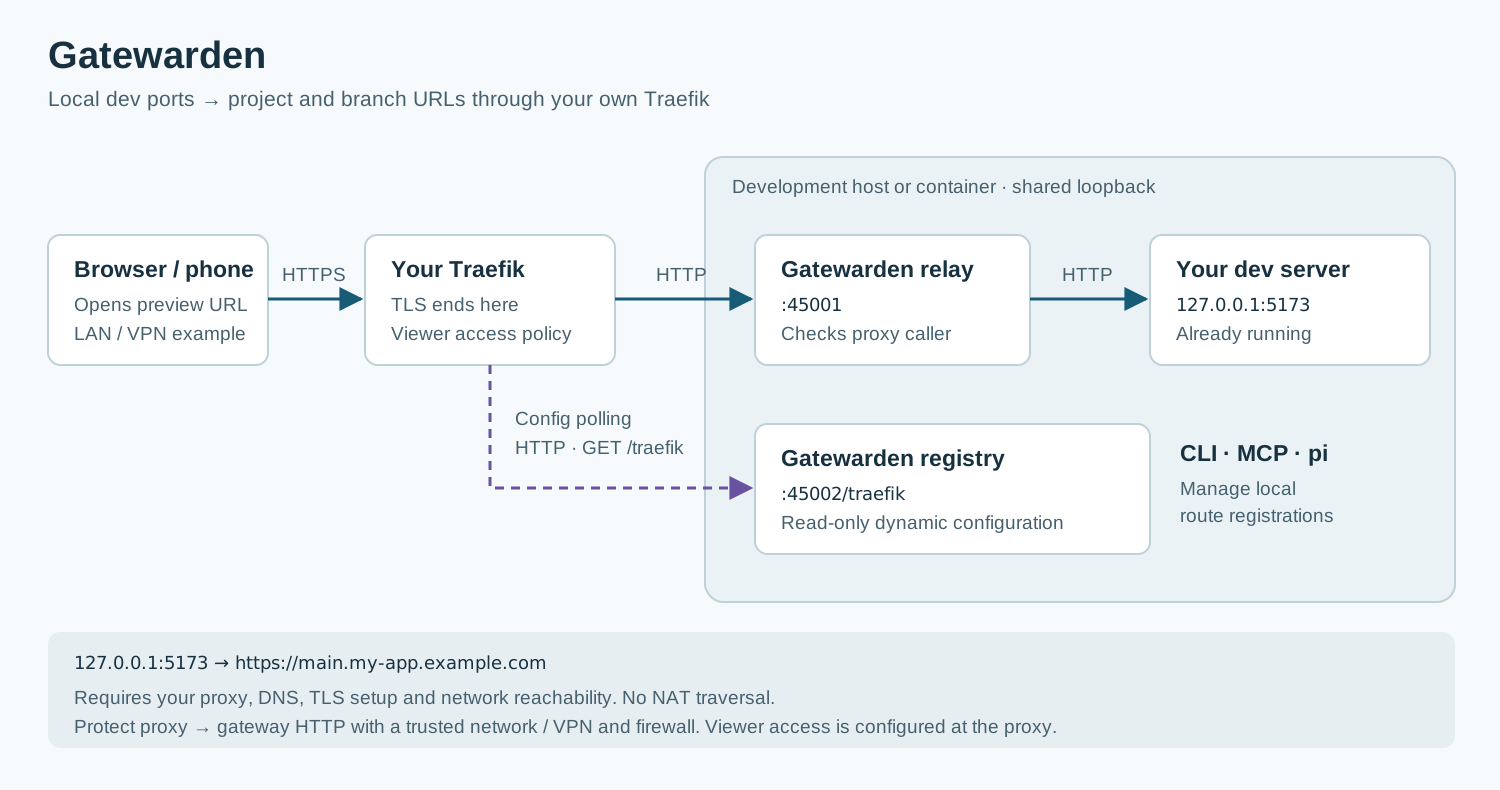
Traefik polls the registry for dynamic configuration and sends application
requests to the relay. The relay looks up the registered port and forwards to
127.0.0.1. Gatewarden and the dev server must share the same loopback network
namespace: for a container deployment, that normally means the same container.
TLS terminates at Traefik. The proxy-to-gateway connections use HTTP. Keep that path on a trusted network or protect it with a VPN and restrictive firewall rules.
Requirements for the included Traefik adapter
- Node.js 20.11 or later, as declared by the current package. Prefer a maintained Node release.
- An existing Traefik v2/v3 proxy with DNS and TLS configured for your dev names.
- Network reachability from Traefik to the registry and relay, normally ports 45002 and 45001.
- The proxy's source address in the gateway's trust configuration.
The development server is started separately. Gatewarden manages routes and forwarding, rather than the dev-server process.
Quick start
1. Install on the machine or in the container that runs your dev servers:
npm install -g @malarstrom/gatewarden2. Configure the gateway with the setup wizard:
gatewarden setup3. Wire the proxy. Apply the HTTP-provider snippet printed by setup to Traefik's static configuration, then restart Traefik. Setup cannot change the remote proxy for you. Configure the trust list and, if used, shared-secret headers on both paths. See the Traefik guide.
4. Start your dev server separately, then register its local port:
gatewarden register --project my-app --branch main --port 51735. Check the installation with gatewarden doctor, then open the returned
URL from the intended client. Use the returned URL verbatim.
6. Remove the route when finished:
gatewarden unregister --project my-app --branch mainInstallation starts no daemon. Commands that need it start the daemon on demand. For project-local installation, platform paths and installation-script behavior, see setup and install scripts.
Security and exposure
A registered app can be reached by everyone your proxy permits. Configure viewer authentication and access restrictions at the proxy or application. The gateway's source-CIDR checks and optional shared secret guard the proxy-to-gateway connection; they do not sign a person in to the preview.
The registry has no remote route-write API. The relay only targets registered ports on loopback. Both listeners bind to network interfaces; use a restrictive firewall and review the effective trust list. In the current implementation, configuration loading also adds detected IPv6 network prefixes to that list.
A route reported as up passed a local port probe. This does not establish that
DNS, certificates, proxy routing or the application work from another device.
For limits, supported versions and private vulnerability reports, read security policy.
Choosing a tool
See the deployment comparison for architectural differences, operator responsibilities and source references.
| Your need | Consider |
|---|---|
| Project/branch routes through your own proxy, managed by CLI or agent; Traefik adapter included | Gatewarden |
| One or two stable routes with minimal extra tooling | Manual Traefik configuration and a reachable backend |
| Reach localhost through NAT without building a direct proxy path | ngrok or localtunnel |
| An outbound connector into Cloudflare's network | Cloudflare Tunnel |
| A self-hosted tunnel/reverse proxy with broader protocol support | frp |
| Private sharing within an existing tailnet | Tailscale Serve |
These tools use different network and operational models. Self-hosting and HTTPS alone do not establish a comparative security ranking.
For AI agents
The gatewarden-mcp binary provides a stdio MCP server. Configure the executable
and working directory using your client's supported format.
| Tool | Input | Output |
|---|---|---|
publish_dev_server |
{ port, project?, branch?, label? } |
{ url, fqdn, project, branch, port, state } |
remove_dev_server |
{ project, branch } |
{ removed, fqdn? } |
list_dev_servers |
{} |
{ routes: [{ project, branch, port, fqdn, url, state }] } |
dev_gateway_status |
{} |
{ daemon, proxy, config, reachable } |
For publishing, project and branch can be inferred from the working directory.
Return the tool's URL verbatim, and remove the route when the dev server is stopped.
MCP tool calls can start the daemon, including list and status calls.
The package also ships a Gatewarden agent skill
and a pi extension with a /routes view. Install or activate integrations using
your client's supported
mechanism; merely installing the npm package does not configure every client.
CLI reference
| Command | Purpose |
|---|---|
gatewarden register --project p --branch b --port N |
Register or update a route |
gatewarden unregister --project p --branch b |
Remove a route |
gatewarden list |
List registrations; --json returns structured output |
gatewarden status |
Inspect daemon and installation state |
gatewarden config [--write] |
Show configuration or write the configuration file |
gatewarden setup |
Configure the gateway interactively |
gatewarden start |
Start the daemon |
gatewarden stop |
Stop the daemon |
gatewarden doctor [--strict] |
Diagnose installation and connectivity |
gatewarden install-service [--no-enable] |
Install the platform service |
gatewarden version |
Print the package version |
Global options include --config, --state-dir, --json, --version and --help.
CLI read commands (list, status, config, doctor) do not start the daemon.
See the setup guide for migration, platform service behavior
and uninstalling the package.
The proxy adapter
The core delegates proxy discovery, configuration rendering and wiring to
ProxyAdapter. Traefik v2/v3 is the bundled adapter; another proxy needs an
implemented adapter included in the package. The adapter guide
describes the contract and how the catalog selects one.
Documentation and project status
- Setup and configuration
- Traefik integration
- Diagnostics and troubleshooting
- Source and contribution guide
- Changelog
Gatewarden is an early 0.1.x project. Check the security policy for supported versions. Reports about vulnerabilities belong in the private reporting channels listed there; ordinary bugs and feature requests belong in GitHub Issues.
This is a one-person project. For ordinary support, write to npm@malarstrom.se with the command, expected result and relevant diagnostics. Remove secrets before sharing command output. Security reports go privately to the same address using the process in the security policy.
MIT licensed. See LICENSE.