@villoh/pi-btw
A pi extension for parallel side conversations with /btw
Package details
Install @villoh/pi-btw from npm and Pi will load the resources declared by the package manifest.
$ pi install npm:@villoh/pi-btw- Package
@villoh/pi-btw- Version
0.6.0- Published
- Oct 21, 2026
- Downloads
- 246/mo · 13/wk
- Author
- villoh
- License
- MIT
- Types
- extension, skill
- Size
- 439.7 KB
- Dependencies
- 0 dependencies · 3 peers
Pi manifest JSON
{
  "skills": [
    "./skills"
  ],
  "extensions": [
    "./extensions/btw.ts"
  ]
}
Security note
Pi packages can execute code and influence agent behavior. Review the source before installing third-party packages.
README
pi-btw
This fork is based on the original
dbachelder/pi-btwrepository and adds 4 things on top of the base version: a persistentpi-btw.jsonmodel/thinking default (readBtwConfig/writeBtwConfig), a follow-up queue so you can type the next question while one is still answering,/btw resumeto pick and continue any earlier BTW thread from this session, and a scope picker (entire thread / last exchange / from exchange N) before/btw injector/btw summarizeinstead of always sending the whole thread. See inlineponytail:comments inextensions/btw.tsfor the simplifications made along the way.
A small pi extension that adds a /btw side conversation channel.
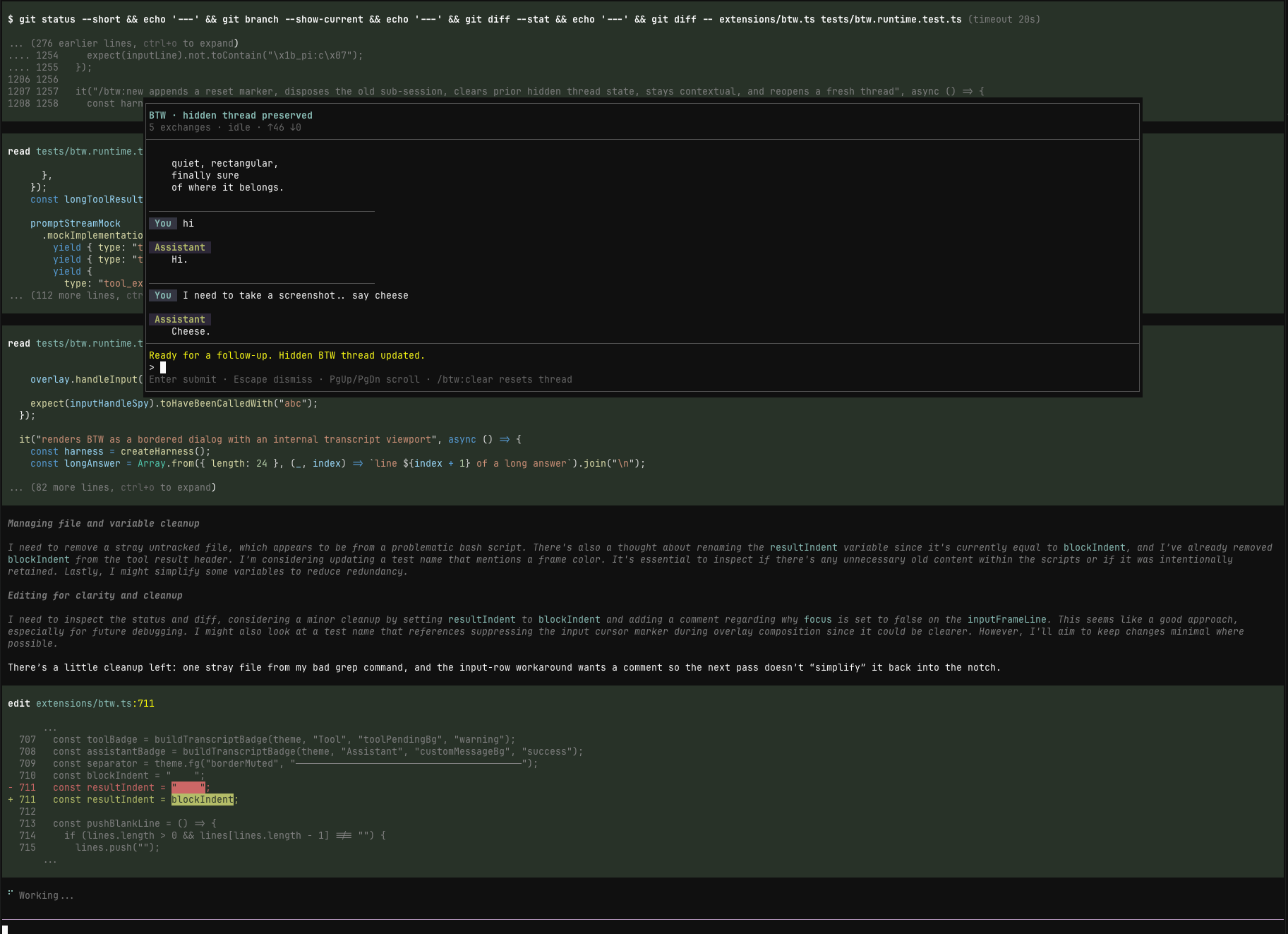
/btw opens a real pi sub-session with coding-tool access, and it runs immediately even while the main agent is still busy.
What it does
- opens a parallel side conversation without interrupting the main run
- runs that side conversation as a real pi sub-session with
read/bash/edit/writetool access - keeps a continuous BTW thread by default
- supports
/btw tangentfor a contextless side thread that does not inherit the current main-session conversation - opens a focused BTW modal shell with its own composer and transcript
- keeps the BTW overlay open while you switch focus back to the main editor with
Alt+/,Super+/, orCtrl+Alt+W(remappable) - keeps BTW thread entries out of the main agent's future context
- supports BTW-only model and thinking overrides without changing the main thread settings
- lets you inject the full thread, or a summary of it, back into the main agent
- optionally saves an individual BTW exchange as a visible session note with
--save - on RPC/SDK hosts (no TUI overlay), answers are shown as visible session notes and the question must be passed inline
Install
Supports Pi 0.85.1 through 1.x (type-checked against 0.85.1, 0.99.2 and 1.3.0).
From npm:
pi install npm:@villoh/pi-btwTry it without installing:
pi -e npm:@villoh/pi-btwFrom a local checkout
pi install /absolute/path/to/pi-btw
# or, without installing:
pi -e /absolute/path/to/pi-btw
Usage
/btw ask what file defines this route?
/btw ask --save summarize the last error in one sentence
/btw new let's start a fresh thread about auth
/btw tangent brainstorm from first principles without using the current chat context
/btw readonly what does this module do?
/side what file defines this route?
/btw model openai gpt-5-mini openai-responses
/btw thinking low
/btw inject implement the plan we just discussed
/btw summarize turn that side thread into a short handoff
/btw resume
/btw clear
/btw help
/btw resume
Lists every earlier BTW thread from the current session (by its first question, exchange count, and mode) and lets you pick one to continue. The current thread is excluded from the list.
Persistent defaults
/btw model and /btw thinking also write to pi-btw.json in the pi agent dir, so the override becomes the default for brand-new sessions too, not just the current one. A session's own override (set/cleared via those commands) still wins over the file default for that session.
Queued follow-ups
Type and submit another question while BTW is still answering the previous one — it queues (shown as "Queued (n pending)...") and runs right after, in order, instead of erroring.
Scope picker on inject/summarize
When the thread has more than one exchange, /btw inject and /btw summarize now ask how much to bring to main: the entire thread, the last exchange only, or everything from a given exchange onward.
Extension tools (opt-in)
By default BTW children only get Pi's built-in tools. To give them tools from specific extensions, list the sources in btw.json:
{ "extensions": ["npm:some-pi-extension", "./my-extension.ts"] }- global file:
<pi agent dir>/btw.json; project file:.pi/btw.json(only read for trusted projects) - a project list replaces the global one, including an explicit empty list
- local paths resolve relative to the file that lists them;
npm:andgit:sources are installed into a separate BTW-owned root so they do not share module state with the main session - a local path that the main session already loaded is rejected; use an
npm:/git:source instead - applies to
/btw ask,/btw newand/btw tangent;/btw readonlynever loads extensions and summarize stays tool-free - an invalid
btw.json, a tool name that collides with a built-in, or a startup error fails the request with the real error instead of being ignored - this is separate from
pi-btw.json(model/thinking/built-in tools defaults);btw.jsononly supports theextensionsandworkspacekeys - the child's system prompt states the tools it actually has, overriding tool claims inherited from the main session
SSH workspace (opt-in)
When the main session works on a remote host through @99percentpeople/pi-ssh-remote (0.6.2 or newer), a BTW child still runs on your machine by default: its read/bash/edit/write would touch local files, not the remote ones. To run them on the parent's remote host instead, set this in ~/.pi/agent/btw.json or a trusted project's .pi/btw.json:
{ "workspace": "ssh" }- BTW opens its own SSH connection to the parent's current target, port and directory. It uses
pi-ssh-remote's transport and remote-adapter APIs directly and never runs its extension factory, so do not add that package to BTW'sextensionslist - authentication is whatever the parent uses (SSH keys, agent, the parent's SSH config file); BTW never prompts for or copies passwords
/btw ask,/btw new,/btw tangentand/sideget remoteread,bash,editandwrite;/btw readonlygets remoteread,grep,findandlsonly. Tools from/btw configthat the remote workspace does not provide are dropped instead of silently running locally- there is no fallback to local tools: a failed connection, a lost connection, or no active parent SSH workspace is reported as an error
- the thread is tied to one workspace. After the parent changes host or directory, reconnects, or runs
/ssh-exit, run/btw clearbefore continuing; a saved thread cannot be resumed against a different workspace - the overlay title and the child's system prompt show the workspace (
SSH host:port:/dir); instructions and session files stay local - the project setting overrides the global one, independently of
extensions; untrusted project settings are ignored. Use"workspace": "local"to select local tools explicitly
Commands
/btw ask [--save] <question>
/btw <question> remains a shorthand for /btw ask <question>, and /btw with no arguments opens the overlay.
- runs right away
- works while pi is busy
- creates or reuses a real BTW sub-session instead of a one-off completion call
- continues the current BTW thread
- opens or refreshes the focused BTW modal shell
- streams into the BTW modal transcript/status surface
- persists the BTW exchange as hidden thread state
- with
--save, also saves that single exchange as a visible session note
Overlay controls
Alt+/,Super+/, orCtrl+Alt+Wtoggles focus between BTW and the main editor without closing the overlay (Super+/needs a terminal that reports Super, e.g. via the Kitty keyboard protocol)- set
PI_BTW_FOCUS_KEYSto a comma-separated list of pi-tui key ids (e.g.PI_BTW_FOCUS_KEYS="ctrl+/,ctrl+alt+b") to replace those focus keys; invalid entries are ignored and the defaults are kept if none are usable - typing
/in the composer lists/btwand/side; after/btwit lists the subcommands. Navigate withUp/Down, accept withTab(orEnteron a partial match), dismiss the list withEsc. Other slash input is still sent to the sub-session as a normal prompt Alt+wtoggles between the framed window layout and a full-width layout without side borders, so terminal Shift+drag selection captures only the dialog's text- while BTW is streaming, the first
Escaborts the request (and drops queued follow-ups) and keeps the partial transcript visible; pressEscagain to dismiss - while BTW is idle,
Escdismisses the overlay immediately - transcript, thinking, and saved
--savenotes render as Markdown - BTW now opens top-centered so the main session remains visible underneath it
/btw new [question]
- clears the current BTW thread
- starts a fresh thread that still inherits the current main-session context
- optionally asks the first question in the new thread immediately
- if no question is provided, opens a fresh BTW modal ready for the next prompt
/btw tangent [--save] <question>
- starts or continues a contextless tangent thread
- does not inherit the current main-session conversation
- if you switch from
/btwto/btw tangent(or back), the previous side thread is cleared so the modes do not mix - opens or refreshes the same focused BTW modal shell
- with
--save, also saves that single exchange as a visible session note
/btw readonly [--save] <question>
- starts or continues an enforced read-only side thread
- inherits the current main-session conversation, like
/btw ask - its child session only has
read,grep,findandls;bash,editandwriteare never available, and the tools set in/btw configis ignored for it - the overlay title shows
read-only - switching between
ask,tangentandreadonlyclears the previous side thread so the capability boundary stays unambiguous - with
--save, also saves that single exchange as a visible session note
/side
- alias for
/btw(same thread, overlay, model and thinking settings)
/btw clear
- dismisses the BTW modal/widget
- clears the current BTW thread
/btw inject [instructions]
- sends the full BTW thread back to the main agent as a user message
- if pi is busy, queues it as a follow-up
- clears the BTW thread after sending
/btw summarize [instructions]
- summarizes the BTW thread with the current effective BTW model
- always runs summarize with thinking off, even if BTW chat is using a thinking override
- injects the summary into the main agent
- if pi is busy, queues it as a follow-up
- clears the BTW thread after sending
/btw model [<provider> <model> <api> | clear]
- with no args, shows the current effective BTW model and whether it is inherited or overridden
- with values, sets a BTW-only model override
clearremoves the override and returns BTW to inheriting the main thread model- if the configured BTW model has no credentials, BTW warns and falls back to the main thread model
/btw thinking [<level> | clear]
- with no args, shows the current effective BTW thinking level and whether it is inherited or overridden
- with a value, sets a BTW-only thinking override for normal BTW chat
clearremoves the override and returns BTW to inheriting the main thread thinking level- changing
/btw modelor/btw thinkingdisposes the current BTW sub-session and applies the new settings on the next BTW prompt while preserving the hidden thread
Behavior
Real sub-session model
BTW is implemented as an actual pi sub-session with its own in-memory session state, transcript events, and tool surface.
- contextual
/btwthreads seed that sub-session from the current main-session branch while filtering out BTW-visible notes from the parent context /btw tangentstarts the same BTW UI in a contextless mode with no inherited main-session conversation- BTW can inherit the main thread model/thinking settings or use BTW-only overrides via
/btw modeland/btw thinking /btw summarizeuses the current effective BTW model but keeps thinking off- the overlay transcript/status line is driven from sub-session events, so tool activity, streaming deltas, failures, and recovery are all visible without scraping rendered output
- handoff commands (
/btw injectand/btw summarize) read from the BTW sub-session thread rather than maintaining a separate manual transcript model
In-modal slash behavior
Inside the BTW modal composer, slash handling is split at the BTW/session boundary:
/btw new,/btw tangent,/btw clear,/btw model,/btw thinking,/btw inject, and/btw summarizestay owned by BTW because they control BTW lifecycle, configuration, or handoff behavior- any other slash-prefixed input is routed through the BTW sub-session's normal
prompt()path - this means ordinary pi slash commands like
/helpare handled by the sub-session instead of being rejected by a modal-only fallback - if the sub-session cannot handle a slash command, BTW surfaces the real sub-session failure through the transcript/status state instead of inventing an "unsupported slash input" warning
This keeps BTW-owned lifecycle commands explicit while giving the side conversation the same slash-command surface as the underlying sub-session.
Behavior
Hidden BTW thread state
BTW exchanges are persisted in the session as hidden custom entries so they:
- survive reloads and restarts
- rehydrate the BTW modal shell for the current branch
- preserve whether the current side thread is a normal
/btwthread or a contextless/btw tangent - preserve the current BTW-only model and thinking overrides for that session history
- stay out of the main agent's LLM context
Visible saved notes
If you use --save, that one BTW exchange is also written as a visible custom message in the session transcript.
Why
Sometimes you want to:
- ask a clarifying question while the main agent keeps working
- think through next steps without derailing the current turn
- explore an idea, then inject it back once it's ready
Included skill
This package also ships a small btw skill so pi can better recognize when a side-conversation workflow is appropriate.
It helps with discoverability and guidance, but it is not required for the extension itself to work.
Development
The extension entrypoint is:
extensions/btw.ts
The included skill is:
skills/btw/SKILL.md
To use it without installing:
pi -e /path/to/pi-btwLicense
MIT © Villoh. Forked from dbachelder/pi-btw © Dan Bachelder; see LICENSE for both notices.