@wrenchpilot/pi-sidepanel
A Pi TUI extension that displays session, model, token, performance, Git, and local inference status in a side panel.
Package details
Install @wrenchpilot/pi-sidepanel from npm and Pi will load the resources declared by the package manifest.
$ pi install npm:@wrenchpilot/pi-sidepanel- Package
@wrenchpilot/pi-sidepanel- Version
0.2.2- Published
- Oct 20, 2026
- Downloads
- 945/mo · 16/wk
- Author
- wrenchpilot
- License
- MIT
- Types
- extension
- Size
- 415.5 KB
- Dependencies
- 0 dependencies · 3 peers
Pi manifest JSON
{
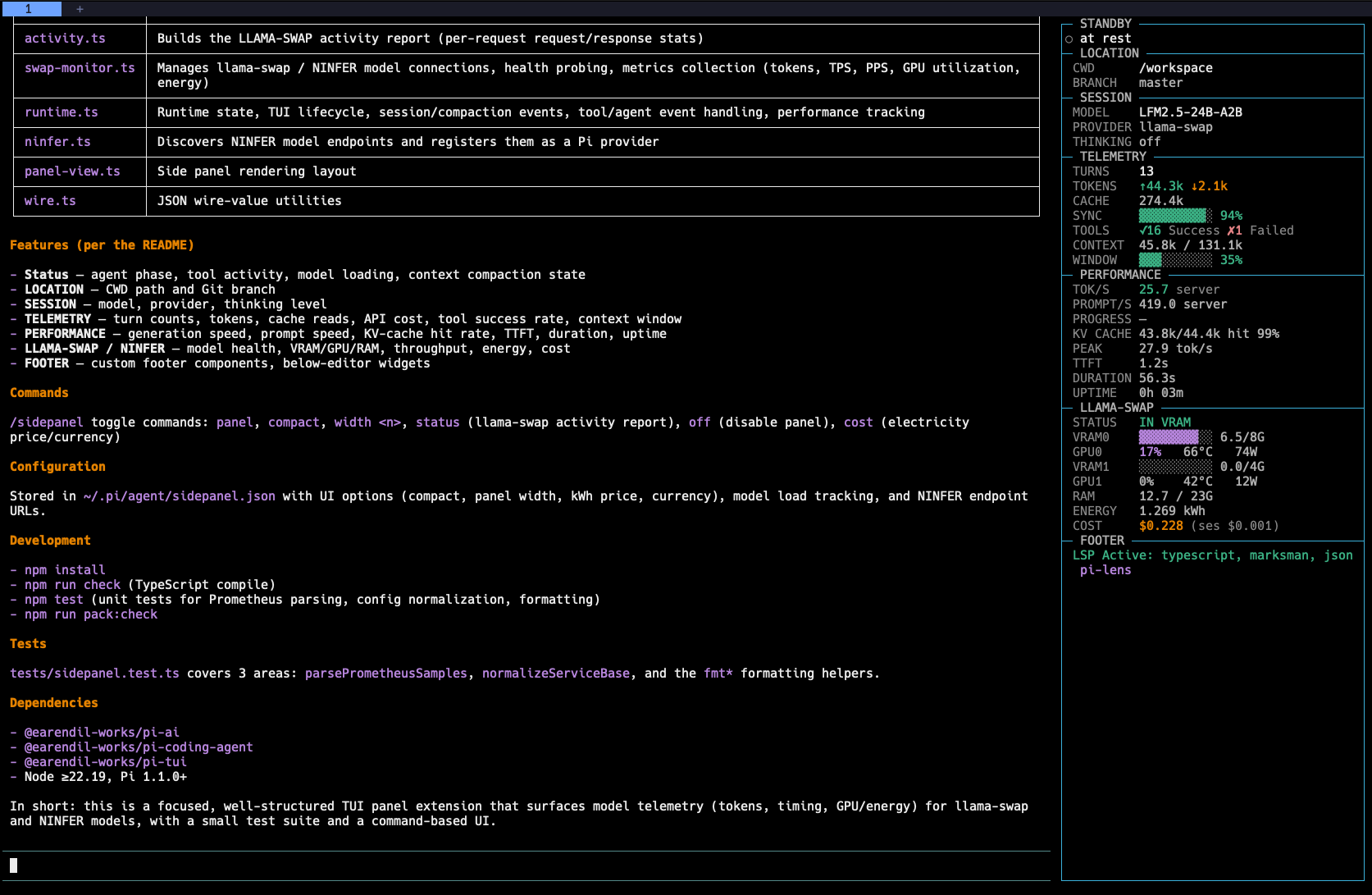
  "image": "https://raw.githubusercontent.com/wrenchpilot/pi-sidepanel/master/screenshot/pi-sidepanel.png",
  "extensions": [
    "./extensions/sidepanel.ts"
  ]
}
Security note
Pi packages can execute code and influence agent behavior. Review the source before installing third-party packages.
README
Pi Side Panel
A Pi TUI extension that adds a right-hand side panel for session, model, token, performance, Git, extension footer content, and local inference information.
This extension was extracted and adapted from the side panel in b-iurea/pi-magi-theme.
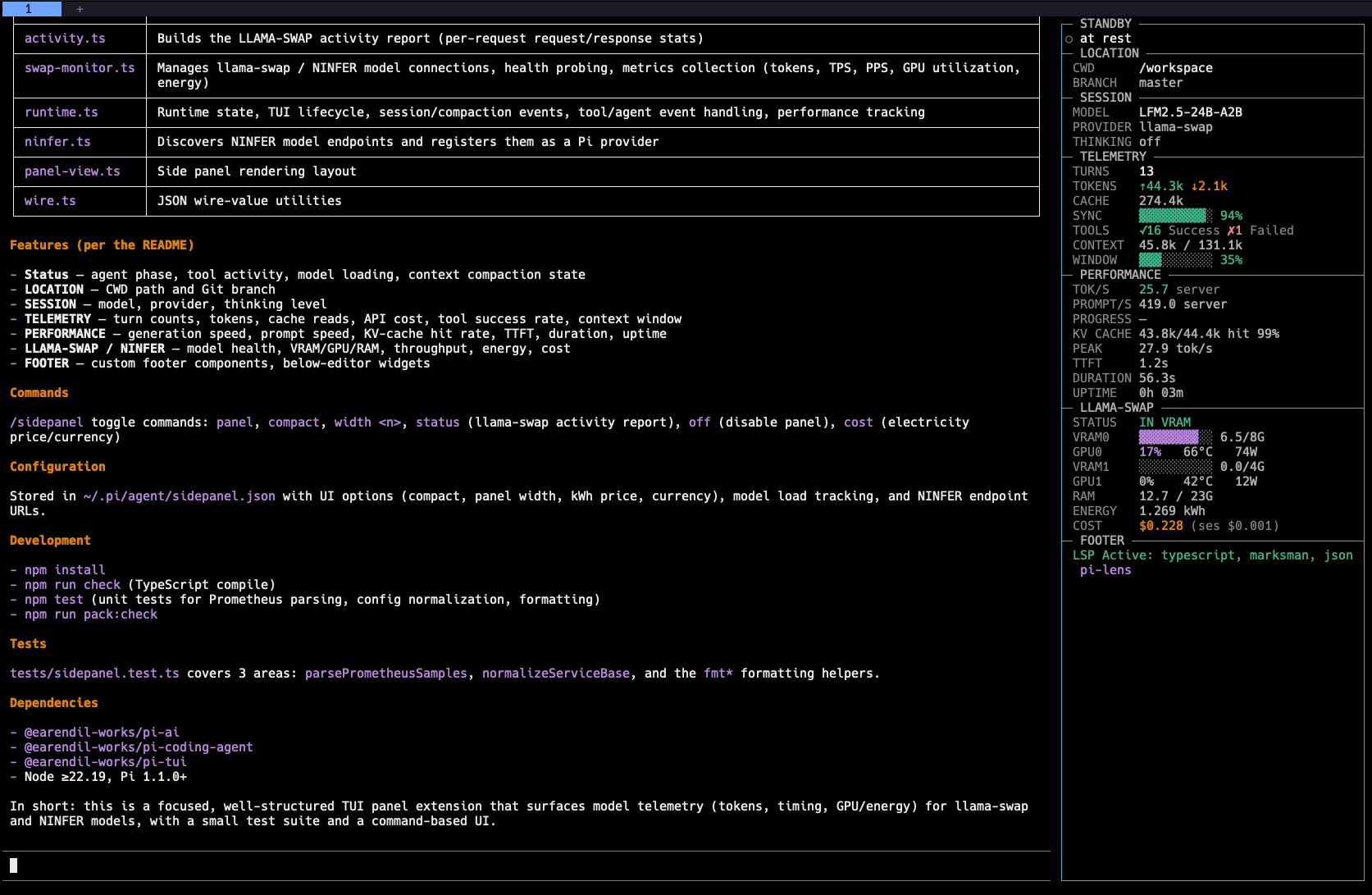
Screenshot
Install
Install the published Pi package for persistent use:
pi install npm:@wrenchpilot/pi-sidepanelTo try it for one invocation without adding it to Pi's settings:
pi -e npm:@wrenchpilot/pi-sidepanelFor local development, load the extension source directly:
pi --extension ./extensions/sidepanel.tsThe package contains the TypeScript source; Pi loads it directly and supplies its Pi runtime dependencies. The panel is available in TUI mode. Non-interactive modes continue to work without rendering terminal UI.
Panel sections
- Status — current agent phase, tool activity, model loading, and context-compaction state.
- LOCATION — home-relative
CWDpath and Git branch. Long paths wrap within the panel. - SESSION — model, provider, and thinking level.
- TELEMETRY — turns, token totals, cache reads, API cost, tool success rate, context-window usage, and hygiene counters.
- PERFORMANCE — generation speed, prompt speed, KV-cache hit rate, TTFT, duration, and uptime.
- LLAMA-SWAP / NINFER — model health, VRAM/GPU/RAM metrics, throughput, energy, and cost when the active provider supports them.
- FOOTER — footer status text, below-editor widgets, and custom footer components published by any extension. Long values wrap within the panel.
The sidepanel takes over Pi's normal footer area and mirrors its content in the FOOTER section. This includes extension status values, below-editor widgets, and custom footer components. /sidepanel off restores Pi's built-in header and footer for the rest of the session.
Commands
/sidepanel panel              Toggle the panel
/sidepanel compact            Toggle compact mode
/sidepanel width 48           Set panel width immediately
/sidepanel width reset        Restore the default width
/sidepanel status             Show the llama-swap activity report
/sidepanel cost               Set electricity price and currency
/sidepanel off                Disable side-panel chrome for the session
Panel width is clamped to 28–72 columns and saved automatically. Pi's TUI does not expose a native drag-resize handle, so resizing is command-based.
Configuration
Optional configuration is read from:
~/.pi/agent/sidepanel.jsonExample:
{
  "ui": {
    "compact": false,
    "panelWidth": 42,
    "kwhPrice": 0.18,
    "currency": "USD"
  },
  "ninfer": {
    "urls": ["http://127.0.0.1:8000"],
    "apiKey": "optional-api-key"
  }
}
ninfer.urls enables model discovery and registration for NInfer-compatible OpenAI endpoints. The extension also persists model load times and energy totals in this file.
Requirements
- Pi 1.1.0 or newer with TUI extension support
- Node.js 22.19 or newer
Development
Install the development dependencies and run the checks before packing:
npm install
npm run check
npm test
npm run pack:check
License
MIT. See LICENSE.