gentle-quick-peek
Preview a file, its lines around a given line, or its thumbnail from inside a Pi or Gentle Shell session, without opening it.
Package details
Install gentle-quick-peek from npm and Pi will load the resources declared by the package manifest.
$ pi install npm:gentle-quick-peek- Package
gentle-quick-peek- Version
0.1.1- Published
- Nov 2, 2026
- Downloads
- 516/mo · 516/wk
- Author
- skyefm
- License
- MIT
- Types
- extension
- Size
- 120.9 KB
- Dependencies
- 0 dependencies · 2 peers
Pi manifest JSON
{
  "image": "./assets/peek-code.png",
  "extensions": [
    "./extensions/quick-peek.ts"
  ]
}
Security note
Pi packages can execute code and influence agent behavior. Review the source before installing third-party packages.
README
gentle-quick-peek
Peek at a file without leaving your Pi / Gentle Shell session.
Ported from midudev's Claude Code quick-peek plugin to the Pi extension API.
From the current session transcript (or from an explicit argument), a file path
can be inspected in place: a code file shows numbered, syntax-highlighted lines
with the :N line illuminated; an image shows an inline thumbnail when the
terminal supports it; and every preview shows name, type, size and age.
Install
pi install npm:gentle-quick-peek
# or, from Gentle Shell:
gentle-shell install npm:gentle-quick-peek
Usage
Install
Gentle Shell:
gentle-shell install npm:gentle-quick-peekPi:
pi install npm:gentle-quick-peekWithout installing, from a checkout of this repository:
pi -e ./packages/quick-peek/extensions/quick-peek.tsExamples
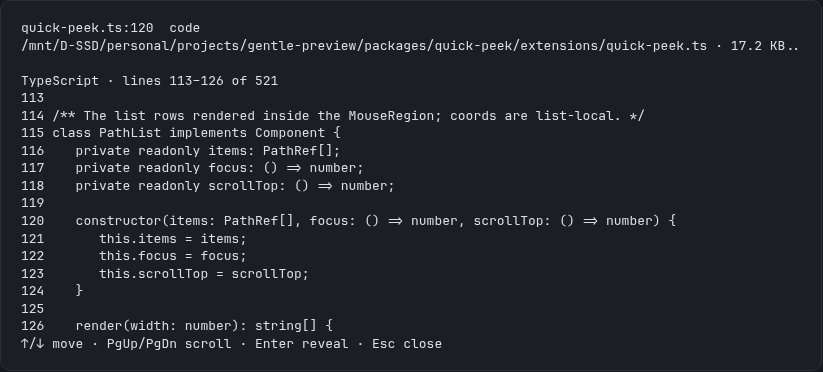

Both frames come from a real session running the packaged extension, captured from the running TUI and re-rendered as a static frame for legibility.
Command: /peek [path[:line[:column]]]
- Without arguments, the overlay lists the file paths found in the current
session transcript (user messages, assistant text, tool-call arguments and
tool results) and previews the focused one. Only paths that resolve to an
existing file or directory are listed. Directories are included on purpose —
a folder previews its first entries — but they are listed after the files and
marked with a trailing
/, so a reply that names a folder and its files does not make the folder look like one more file. - With an argument, that path is previewed directly.
:lineand:line:columnsuffixes are honoured: the requested line is marked and the window is centered around it.
Shortcut: alt+o — same as /peek with no argument. (alt+p was
avoided deliberately: it is a default keybinding for "cycle to previous model"
on Windows and WSL.)
Keyboard (primary path)
| Key | Action |
|---|---|
↑ / ↓ |
Move focus through the path list |
PgUp / PgDn |
Scroll the preview window |
Enter |
Reveal / open the focused file (see below) |
Esc |
Close the overlay |
Mouse (additive, fullscreen only)
In fullscreen mode, hovering a path row moves the preview focus to it and a left click reveals the file. Mouse events are ignored outside fullscreen (Pi routes normalized mouse input to extensions only there) — the keyboard always works.
Per-platform reveal behaviour
Enter (or a click) never throws; failures surface as notifications.
| Platform | File | Directory |
|---|---|---|
| macOS | open -R <file> (reveals in Finder) |
open <dir> |
| Windows | explorer /select,<file> |
explorer <dir> |
| WSL | explorer.exe /select,<windows-path> via wslpath -w |
explorer.exe <windows-path> |
| Linux (incl. Omarchy) | xdg-open <containing dir> |
xdg-open <dir> |
The WSL path conversion runs wslpath -w (3 s timeout) when
WSL_DISTRO_NAME or WSL_INTEROP is set; if it fails, the reveal is reported
as a notification instead of guessing.
Documented Linux fallback: xdg-open cannot select a file, so on plain
Linux the containing directory is opened instead. (The original plugin used
the org.freedesktop.FileManager1 D-Bus interface; that protocol hop is not
implemented here.)
Spawns are bounded (5 s timeout, then killed) and happen only from an explicit user action — never when the extension loads.
Previews
- Code / text — first 20 lines (14 in the overlay window, scrollable with
PgUp/PgDn), line numbers, total line count, guessed language, and a small dependency-free regex highlighter (keywords, strings, comments, numbers) themed with Pi's syntax tokens. - Image — mime type plus pixel dimensions parsed cheaply from the file header (PNG, GIF, WebP VP8/VP8L/VP8X, JPEG). When the terminal supports inline images (Kitty / iTerm2 protocols), the image renders inline; the terminal-capability fallback shows a plain-text summary instead.
- Directory — the first entries and the total count.
- Binary / other — metadata only, with a note.
Documented limits
- Text is never read for files larger than 1 MB or containing a NUL byte; those fall back to a metadata-only preview.
- The highlighter is line-local: a block comment opened on one line is styled only to the end of that line.
- Path extraction is heuristic. Absolute paths,
~/...,./...,../..., relative paths with separators, bare filenames with an extension, and backticked paths containing spaces are recognised; URLs are ignored. Relative paths resolve against the session working directory first and the project root second; anything that does not exist is kept unresolved and skipped by the caller. - The peek cannot be triggered by hovering a path inside built-in chat
messages: Pi exposes no render hook for built-in messages (E3 in the
project ODD doc). The overlay opened by
/peek/alt+ois the extension's own surface, so that is where keyboard and mouse work. - Thumbnail rendering depends on the terminal's image protocol support and is not verified without real terminal emulation (see the project ODD doc, S8).