pi-better-show
Interactive blocks for agent-written Markdown: one vocabulary, text fallback, and answer encoding shared by every host, plus the show_doc extension for pi
Package details
Install pi-better-show from npm and Pi will load the resources declared by the package manifest.
$ pi install npm:pi-better-show- Package
pi-better-show- Version
0.7.2- Published
- Nov 13, 2026
- Downloads
- 4,486/mo · 4,486/wk
- Author
- weihung1017
- License
- MIT
- Types
- extension
- Size
- 354.2 KB
- Dependencies
- 6 dependencies · 3 peers
Pi manifest JSON
{
  "image": "https://raw.githubusercontent.com/wayne930242/pi-better-show/main/docs/images/decide.png",
  "extensions": [
    "./src/extension/index.ts"
  ]
}Security note
Pi packages can execute code and influence agent behavior. Review the source before installing third-party packages.
README
pi-better-show
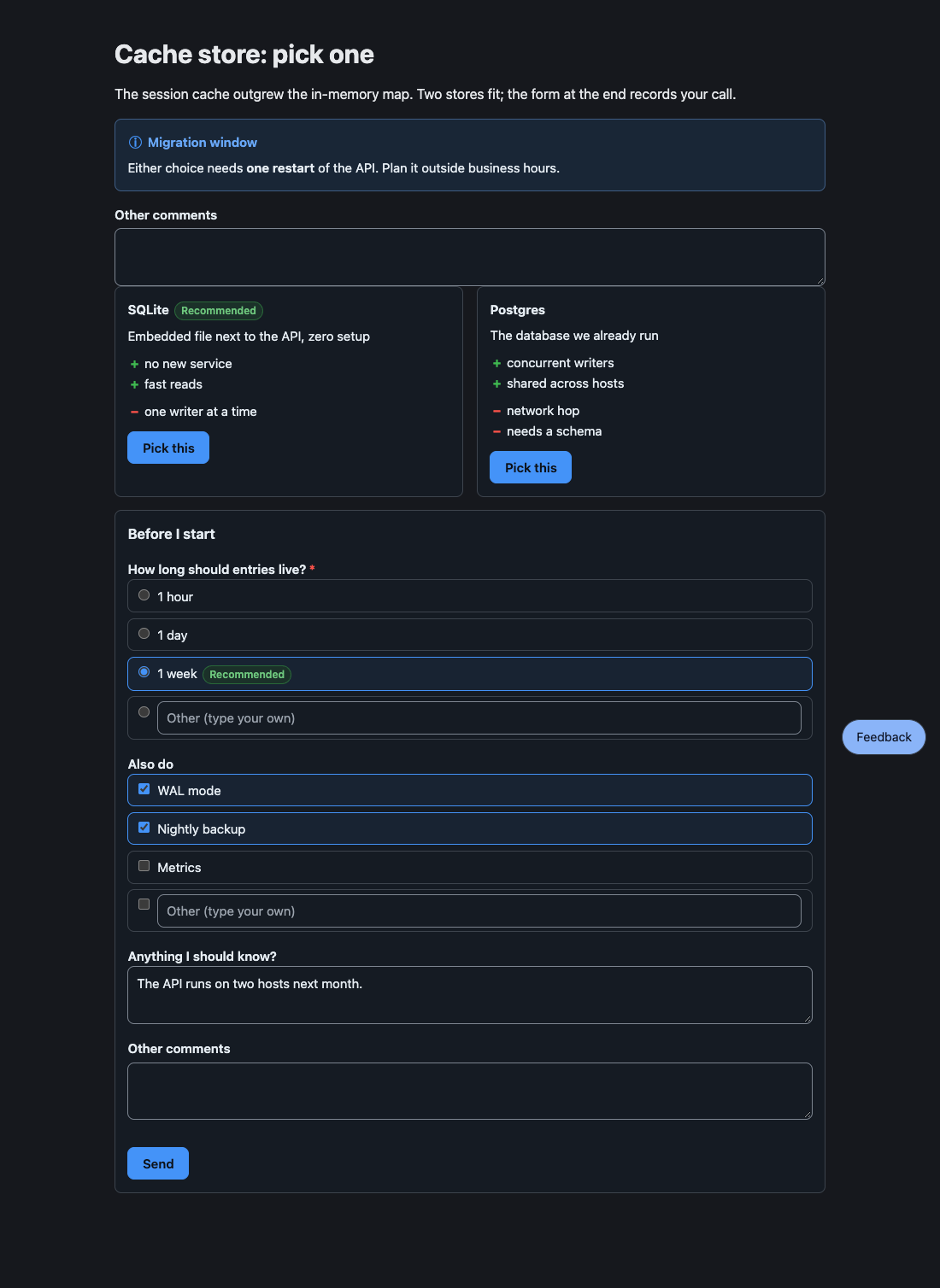
Let your pi agent show you a page instead of a wall of text, and answer it by clicking.
Documentation in English and Traditional Chinese: concepts, every block kind, agent pages, and the library.
Why
- Blocks, not markup. The agent writes a few YAML lines per block; the package owns the layout, the controls, and the code that sends answers back.
- Answers come back as a message. A pick, a form, a comment on a passage or on a diagram node: one message, in a fixed shape.
- About 10 times fewer tokens than the same pages written as HTML (1,253 against 12,364 output tokens, measured).
- One vocabulary for every host. Core, custom elements, and React wrappers share one parser, one text fallback, and one answer encoding.
Install
pi install npm:pi-better-showThen /reload in a running session. If you use pi-herdr-doc-review, uninstall it first (pi uninstall npm:pi-herdr-doc-review): both register show_doc.
Quick start
Ask the agent to show you something. It writes a Markdown file with blocks and calls show_doc({paths, reason, view}), which returns at once:
view: "page"opens the file in your browser; select a passage, or click a diagram node, to comment on it.view: "edit"(the default) opens it in your editor; your saves reach the agent as one net diff per file.
When you press Send on a form, the agent receives:
User submitted a form in the HTML review pane:
- ttl: week
- extras: WAL mode, Nightly backup
Blocks
| Kind | Shows | You answer by |
|---|---|---|
alert, cards, stats |
callouts and tiles with a tone | |
options |
choices with pros and cons | picking one |
form |
single, multi, and text questions | Send |
review |
designs or prototypes to compare | commenting, picking |
checklist, suggest |
items to tick, quick-reply chips | Send, clicking |
table, steps, tree, mindmap |
sortable rows, a timeline, a directory tree, an outline | |
mermaid, diff |
a diagram you can comment on, a coloured diff |
HTML and TSX pages, the pbs-tree CLI, the library entries, and every schema are in the documentation.
Develop
bun install
bun test
bun run check    # tsc, tsc for core without node types, biome
bun run demo     # every element, on http://127.0.0.1:4177/
cd site && npm ci && npm run check && npm run build   # the documentation site
License
MIT