pi-hold-to-talk
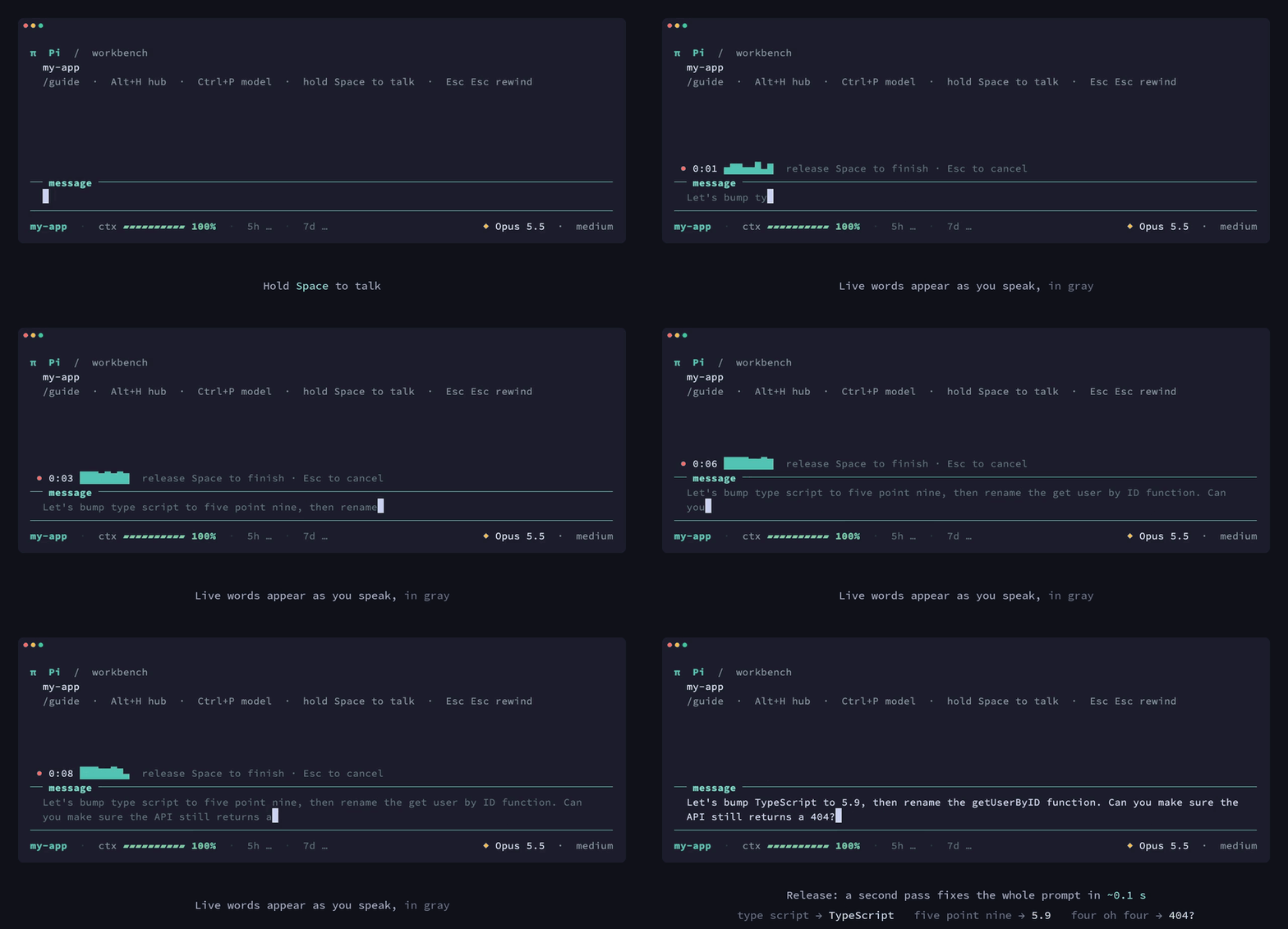
Hold Space to dictate into Pi. Fully local speech recognition on Apple Silicon, with live words in the prompt and a near-instant final pass.
Package details
Install pi-hold-to-talk from npm and Pi will load the resources declared by the package manifest.
$ pi install npm:pi-hold-to-talk- Package
pi-hold-to-talk- Version
0.1.0- Published
- Oct 13, 2026
- Downloads
- 300/mo · 6/wk
- Author
- joaquincampo
- License
- MIT
- Types
- extension
- Size
- 18.1 MB
- Dependencies
- 0 dependencies · 2 peers
Pi manifest JSON
{
  "video": "https://github.com/JoaquinCampo/pi-hold-to-talk/releases/download/v0.1.0/pi-hold-to-talk-demo.mp4",
  "extensions": [
    "./src/index.ts"
  ]
}Security note
Pi packages can execute code and influence agent behavior. Review the source before installing third-party packages.
README
pi-hold-to-talk
Hold Space to dictate into Pi. Words appear in the prompt as you speak, grayed out while they are provisional. When you let go, a more accurate pass over the whole recording replaces them, in about a tenth of a second. Everything runs on your Mac.
- Fully local. Audio and text never leave your machine. Two NVIDIA models run on the Apple Neural Engine through FluidAudio:
- Nemotron 3.5 Streaming writes the live words;
- Parakeet Ultra writes the final text.
- Instant release. The helper watches the Space key itself, so it knows the moment you let go. The final pass over 10 seconds of speech takes about 0.1 s.
- Multilingual. The final pass covers 25 European languages, detected automatically or pinned in the settings. The live words cover English, Spanish, French, Italian, Portuguese and German.
Requirements
- A Mac with Apple Silicon, running macOS 15 or later
- Pi 1.1 or later
- About 1.2 GB of disk for the models, downloaded on first use
Install
pi install npm:pi-hold-to-talkStart Pi. The first session downloads the models, which takes a minute or two on a fast connection; later starts take under a second.
The first time you dictate, macOS asks whether your terminal may use the microphone. If you said no earlier, turn it on under System Settings › Privacy & Security › Microphone, then restart the terminal.
Use
| Action | Result |
|---|---|
| Hold Space | Start listening after about half a second. Words appear at the cursor as you speak, in gray. |
| Release Space | Replace them with the final transcript, in normal text. |
| Esc while holding | Discard the recording and its words. |
| Any other key while holding | Finish, and type that key after the transcript. |
| Enter right after releasing | Send the prompt once the final transcript is in. |
Tapping Space types spaces as usual. A hold is recognised by the keyboard's auto-repeat, so the spaces typed while the hold is being detected are removed again.
The release is read from the key itself while you dictate; nothing watches the keyboard at any other time. If macOS does not allow that, the release is taken from the terminal instead: exact in terminals that support the kitty keyboard protocol, and otherwise when the auto-repeat stops, about half a second later.
Dictation only starts when the prompt editor has focus. Holding Space in a picker, dialog or overlay does what it normally does.
| Command | |
|---|---|
/hold-to-talk on / off |
Turn dictation on or off for this Pi process. |
/hold-to-talk status |
Show the helper state, settings and binary in use. |
/hold-to-talk setup |
Build the helper from source (needs the Xcode command line tools). |
Settings
Create ~/.pi/agent/hold-to-talk.json. Every key is optional:
{
  "language": "es",
  "previewChunkMs": 1120
}| Key | Default | |
|---|---|---|
enabled |
true |
Dictate when holding Space. |
language |
"auto" |
A language code ("en", "es", "pt-BR", …) sharpens recognition when you always speak one language. |
livePreview |
true |
Write words while speaking. Turning it off skips loading the streaming model; text then appears on release. |
previewChunkMs |
560 |
How often live words update: 560, 1120, 2240 or 4480 ms. |
maxSeconds |
300 |
Stop listening after this long. |
helperPath |
null |
Use a different helper binary. |
Changes apply when Pi starts.
How it works
The extension starts a small native helper, pi-hold-to-talk-helper, once per Pi process and talks to it over JSON lines on stdin and stdout:
- The helper keeps both models loaded, using about 60 MB of memory.
- It opens the microphone, and watches the Space key, only between
startandstop. - While you speak, it streams audio through Nemotron and sends
partialevents. - When you release, it runs Parakeet Ultra over the whole recording and sends a
finalevent.
The models punctuate mostly from intonation, so a question read flat can end in a period. Before the final text goes in, a small rule pass adds the "?" (and the "¿" in Spanish) to sentences whose opening words make them unmistakably questions, such as "Can you…", "Why is…", "Puedes revisar…" or "…, right". It never changes a "?" or "!" the model wrote.
The protocol is defined in src/protocol.ts and helper/Sources/HoldToTalkHelper/Protocol.swift.
The helper also works on its own:
pi-hold-to-talk-helper transcribe recording.wav   # print a transcript
pi-hold-to-talk-helper serve --input speech.wav   # replay a file instead of the microphone
pi-hold-to-talk-helper --help
Troubleshooting
- Nothing happens when holding Space. Run
/hold-to-talk status. If the helper is still loading, the widget shows progress while you hold.- If your key repeat is set very slow in System Settings › Keyboard, auto-repeat may be too slow to recognise; a faster repeat rate helps.
- To see exactly what your terminal sends, start Pi with
PI_HOLD_TO_TALK_DEBUG=1. It records raw key input to$TMPDIR/pi-hold-to-talk-input.log.
- "The speech helper is not installed". The package ships a prebuilt helper for Apple Silicon. If it is missing or will not run,
/hold-to-talk setupbuilds it from source. - Each Pi window loads its own helper. Every helper holds the models in memory and on the Neural Engine. Close sessions you are not using if memory is tight.
Development
npm install
npm run check                 # typecheck and unit tests
scripts/build-helper.sh       # build the helper into bin/
pi -e ./src/index.ts          # try the extension without installing it
The helper is a Swift package in helper/. FluidAudio is pinned to an exact revision in helper/Package.swift.
Credits and licenses
- This package: MIT.
- FluidAudio: Apache 2.0.
- Parakeet Ultra (CoreML conversion): CC BY 4.0.
- Nemotron 3.5 ASR Streaming (CoreML conversion): OpenMDW 1.1.
The models are downloaded from Hugging Face on first use and are not part of this package.