pi-path-bar
A Pi extension for compact paths, folder aliases, and theme-aware Git status
Package details
Install pi-path-bar from npm and Pi will load the resources declared by the package manifest.
$ pi install npm:pi-path-bar- Package
pi-path-bar- Version
0.4.0- Published
- Nov 13, 2026
- Downloads
- 300/mo · 65/wk
- Author
- codingbone
- License
- MIT
- Types
- extension
- Size
- 90.9 KB
- Dependencies
- 0 dependencies · 2 peers
Pi manifest JSON
{
  "extensions": [
    "./src/index.ts",
    "./src/reading-mode.ts"
  ]
}
Security note
Pi packages can execute code and influence agent behavior. Review the source before installing third-party packages.
README
pi-path-bar
English | 简体中文
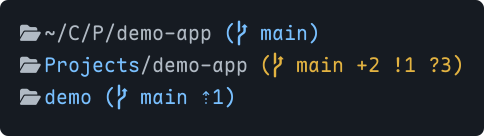
A Pi extension for a compact footer and focused reading. Shows paths, folder aliases, Git status, and local time. Keeps usage statistics, model information, and other extension status lines.
Installation
pi install npm:pi-path-barOr install from GitHub:
pi install git:github.com/johnbitcn/pi-path-barIn an existing Pi session, run /reload, then /path-bar to open settings.
Load only one copy of the extension. Folder icons require a Nerd Font, or you can turn them off in settings.
Settings
Run /path-bar. Use the arrow keys to select an item, Enter or Space to change it, and Esc to exit. Changes apply immediately and are saved automatically. The menu uses English.
| Setting | Default | Choices |
|---|---|---|
| Path display | Short | Short, Auto, Full, Native footer |
| Folder icon | On | On, Off |
| Git status | On | On, Off |
| Session name | On | On, Off |
| Time format | 24h | 24h, 12h (AM/PM) |
| Add folder alias | — | Enter a folder path and a name |
| Manage folder aliases | — | Edit or delete aliases |
- Short: abbreviate intermediate folders and keep the final folder name.
- Auto: show the full path when space allows; otherwise abbreviate it.
- Full: do not abbreviate; truncate if needed.
- Native footer: restore Pi's built-in footer without losing your settings.
Local time appears at the right of the path line. The home directory is shown as ~. Unicode folder names are supported.
Folder aliases
Choose Add folder alias, then enter a folder path and a display name. Use an absolute path or ~/, or leave the path blank for the current directory.
For example, name ~/CloudDrive/Projects/demo-app demo:
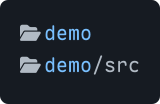
- An alias applies to its folder and descendants. If several aliases match, the longest path wins.
- Use Manage folder aliases to edit or delete them. Leave a field blank to keep its value; Esc cancels.
- Aliases change only the display name. Deleting an alias does not delete the folder.
Git status

| Indicator | Meaning |
|---|---|
⇣N / ⇡N |
N commits behind / ahead of upstream |
*N |
N stash entries |
~N |
N conflicted files |
+N |
N staged entries |
!N |
N unstaged entries |
?N |
N untracked entries |
In the default themes, blue means clean, yellow means changes, and red means conflicts or an active Git operation. Colors follow your theme. Git information is hidden outside a repository.
Reading mode
Loaded automatically with the extension. Enter with the shortcut or command.
Alt+Esc(Mac:Option+Esc): hide the editor and footer. Conversation and tool output remain available for scrolling.- A single
EscorAlt+Escagain: restore the interface and keep your draft. - You can also enter with
/reading-mode.
Requires Pi 1.5 or later in fullscreen mode. Use the command if the shortcut does not respond. Run /reload after switching TUI modes.
When upgrading from the standalone version, remove the -e ./src/reading-mode.ts launch argument to avoid loading it twice.
Notes
- Settings are shared across projects and saved automatically. The default file is
~/.pi/agent/pi-path-bar.json. - Avoid enabling multiple footer-replacement extensions at once; they can override each other.
- The custom footer does not show the native
(auto)marker.
License
MIT. See Third-party notices for related copyright and license texts. This unofficial extension is not affiliated with or endorsed by Pi or Tide.