pi-run-mode
Ask, plan, and auto workflows for pi — control permissions, plan safely, and execute with the right model
Package details
Install pi-run-mode from npm and Pi will load the resources declared by the package manifest.
$ pi install npm:pi-run-mode- Package
pi-run-mode- Version
1.1.0- Published
- Nov 13, 2026
- Downloads
- 426/mo · 23/wk
- Author
- ouzhenkun
- License
- MIT
- Types
- extension
- Size
- 738.9 KB
- Dependencies
- 0 dependencies · 4 peers
Pi manifest JSON
{
  "extensions": [
    "./index.ts"
  ]
}
Security note
Pi packages can execute code and influence agent behavior. Review the source before installing third-party packages.
README
pi-run-mode
Ask, plan, and auto workflows for pi — control permissions, plan safely, and execute with the right model.


Install
pi install npm:pi-run-modeWhy
pi-run-mode adds an ask / plan / auto workflow for balancing control, planning depth, and execution speed. Each mode can use its own model — for example, a stronger model for planning and a faster, cheaper one for execution.
| Mode | Behavior |
|---|---|
| ask | Reads run freely; writes and non-read-only bash require approval. Optional AI review can auto-allow safe commands when enabled. |
| plan | Read-only exploration; only the session plan file may be written. Approval switches to auto for execution. |
| auto | Writes and most bash run freely; risky bash still requires approval. |
Cross-mode hardDeny rules block sensitive paths and dangerous commands in every mode.
rm -rf targeting verified absolute temporary subpaths (such as /tmp/work) is treated as an ordinary mutation: auto allows it, ask requests approval, and plan blocks it. Temporary roots, non-temporary targets, and uncertain paths remain blocked.
Ask mode — bash review
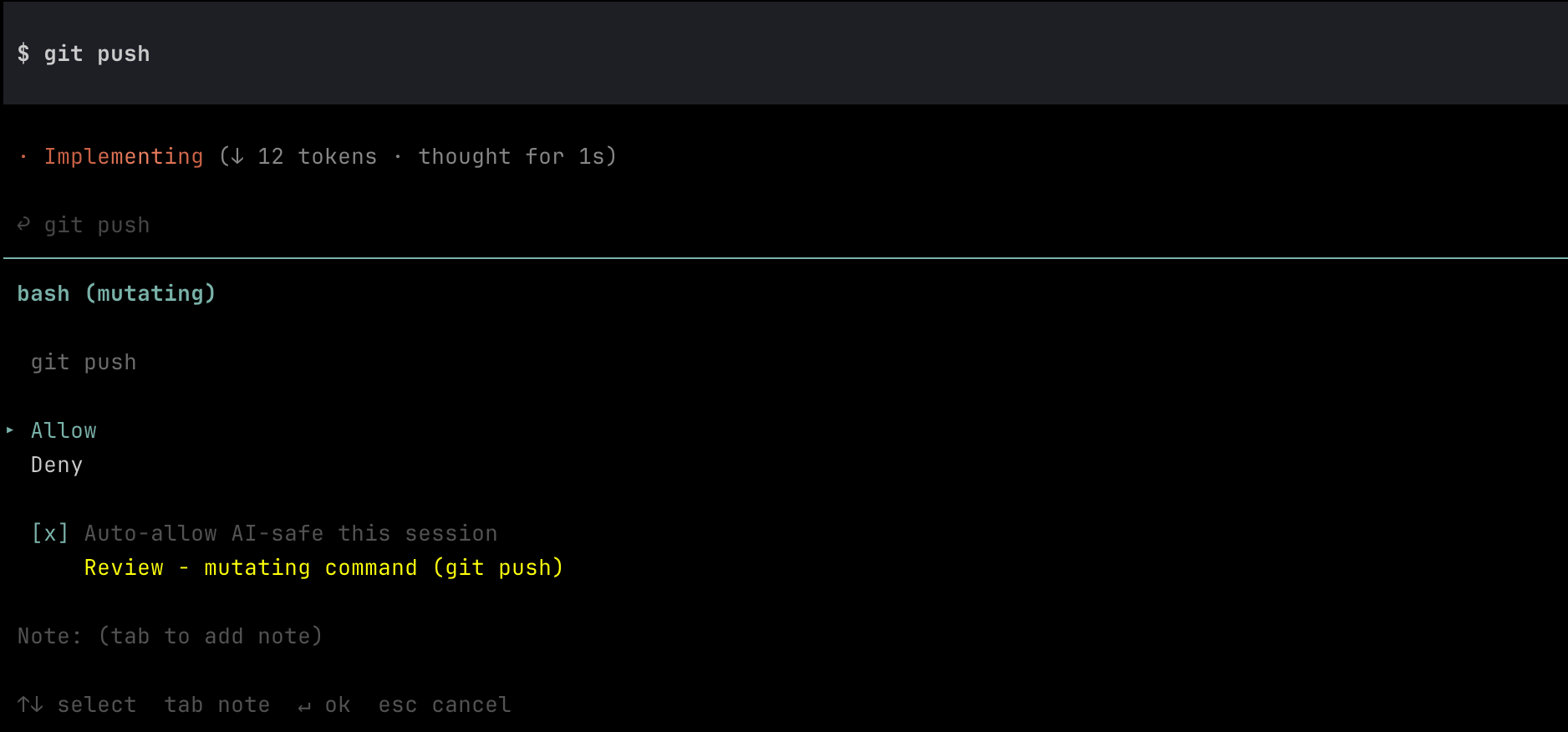
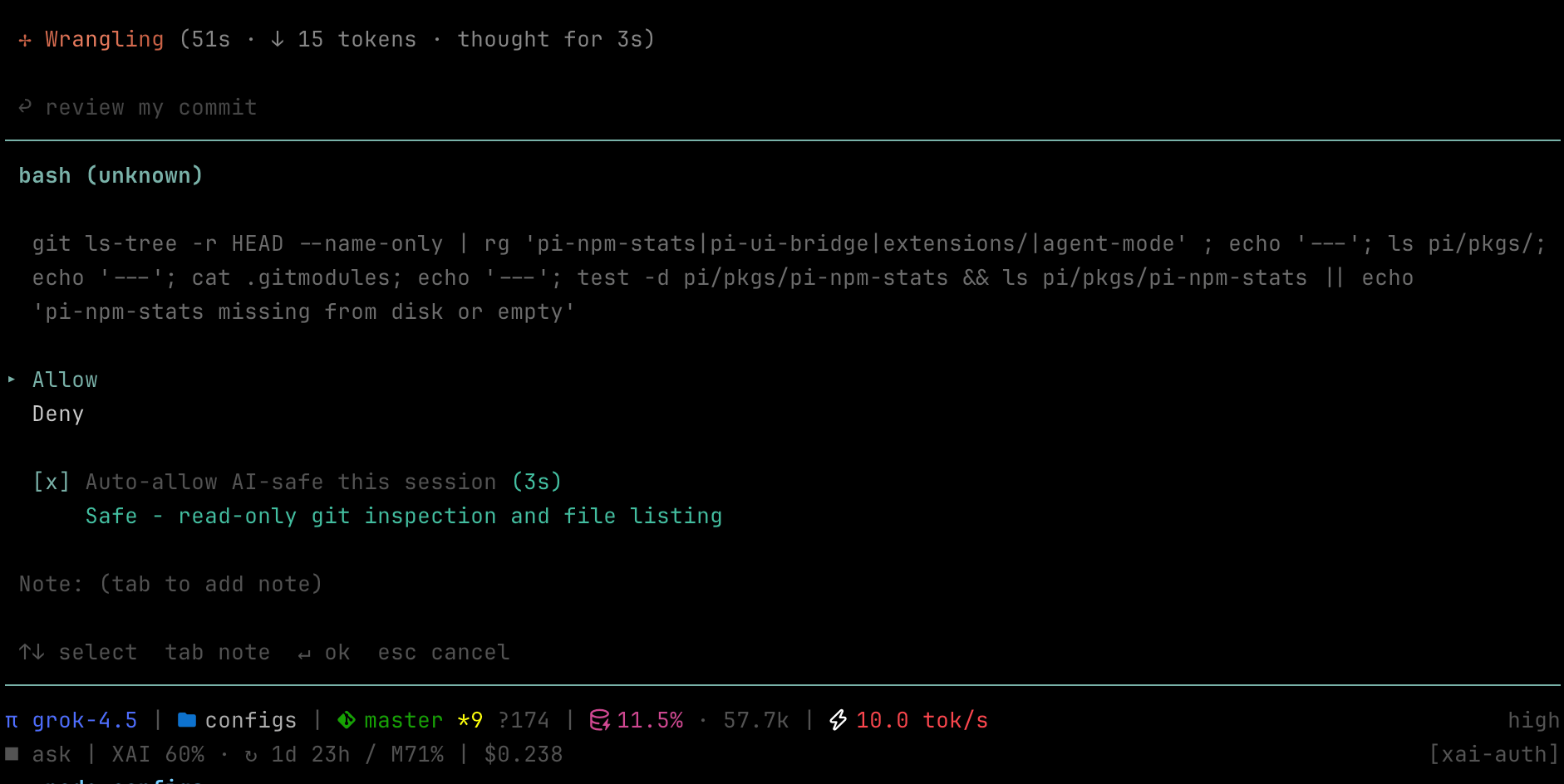
In ask, mutating/risky bash opens an approval dialog. AI review is advisory by default; with Auto-allow AI-safe this session checked, a safe verdict starts a short countdown and auto-submits Allow.
Review (needs human):
Safe (auto-allow countdown):
Plan mode — approve to execute
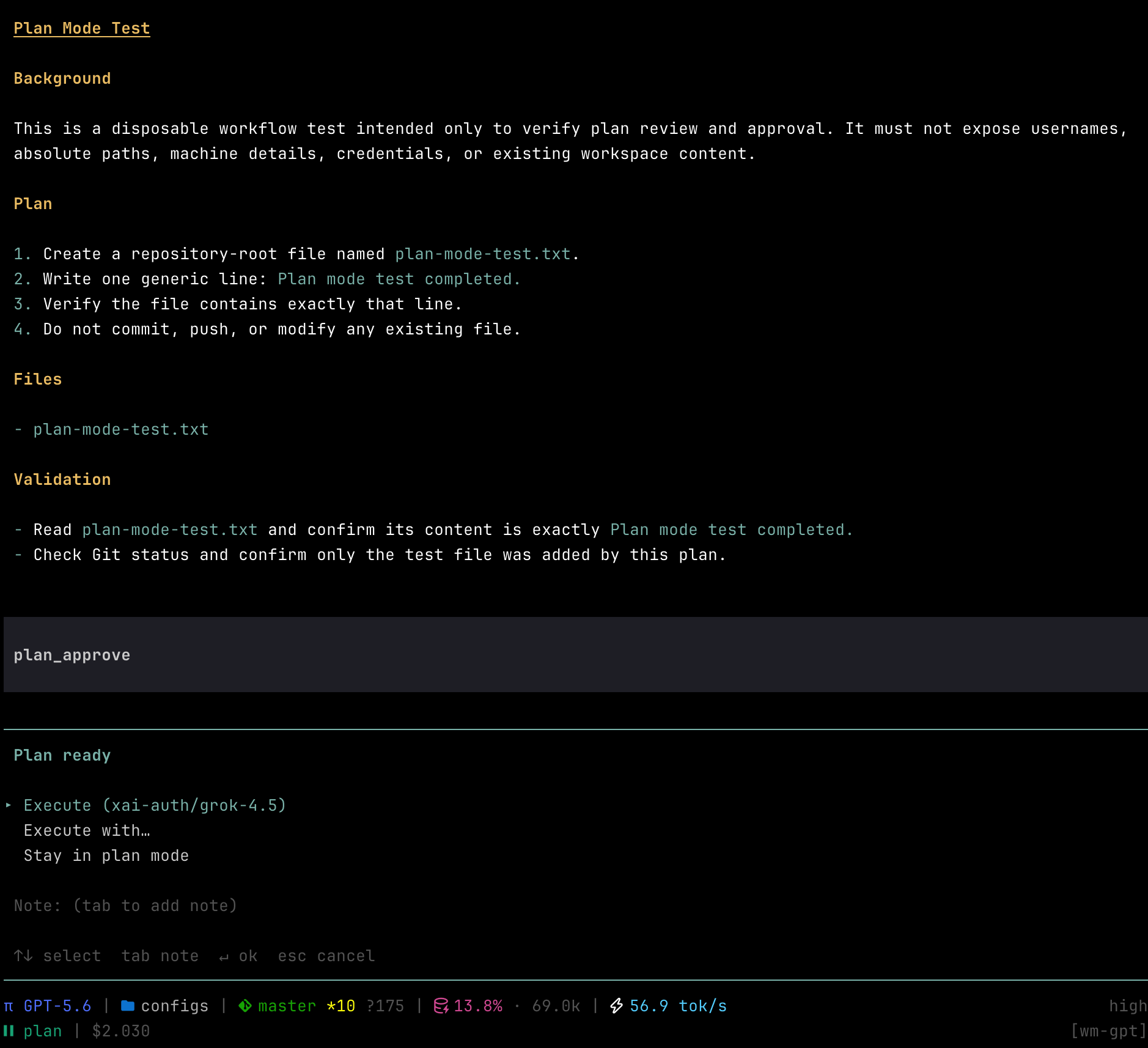
In plan, the model writes a plan file then calls plan_approve. You choose Execute (switch to auto and restore its configured model), Execute with… (switch to auto and pick another model), or Stay in plan mode.
Mode and model flow
ask / auto
  │
  └─ plan_start
       ↓
plan (GPT-5.5)
  ├─ Stay ──────────────────────→ plan (GPT-5.5)
  ├─ Execute ───────────────────→ auto (DeepSeek V4 Flash)
  └─ Execute with… → pick model → auto (selected model)
Usage
| Action | How |
|---|---|
| Show mode and model scope | /run-mode |
| Enable / disable project model memory | /run-mode project on · /run-mode project off |
| Show project model settings | /run-mode project |
| Set mode | /run-mode ask · /run-mode plan · /run-mode auto |
| Request planning | Ask naturally (for example, “plan this first”); the model calls plan_start |
| Cycle mode | /run-mode toggle (or configured shortcut): follows cycleModes order |
| Start pi in plan | pi --plan |
No cycle shortcut is registered by default (pi’s default Shift+Tab cycles thinking level). Set cycleShortcut in config if you want a key.
Avoid legacy ctrl letters that collide with control characters — e.g. ctrl+m is the same byte as Enter, ctrl+i is Tab, ctrl+[ is Escape. Prefer shift+tab, alt+m, or chords with more than one modifier.
Plan tools (model-driven)
| Tool | Purpose |
|---|---|
plan_start |
Enter read-only Plan mode |
plan_approve |
Request Execute / Execute with… / Stay |
Plan content is written to ~/.pi/agent/plans/<sessionId>.md.
Configuration
Create ~/.pi/agent/pi-run-mode.json.
This example uses a stronger model for planning and a cheaper model for everyday approval and execution:
{
  "cycleShortcut": "alt+m",
  "cycleModes": ["auto", "ask", "plan"],
  "modeModels": {
    "ask": { "provider": "deepseek", "id": "deepseek-v4-flash", "thinkingLevel": "medium" },
    "plan": { "provider": "openai", "id": "gpt-5.5", "thinkingLevel": "high" },
    "auto": { "provider": "deepseek", "id": "deepseek-v4-flash", "thinkingLevel": "low" }
  },
  "syncModels": ["ask", "auto"],
  "hardDeny": {
    "read": [".env", ".env.*", "*.pem", "*.key", "~/.ssh/id_*"],
    "write": [".env", ".env.*", "*.pem", "*.key", "~/.ssh", "~/.aws/credentials"],
    "bash": []
  },
  "bashClassifier": {
    "inheritDefaults": true,
    "risky": ["^\\s*deploy\\b"]
  },
  "askAiReview": {
    "autoApproval": true,
    "provider": "deepseek",
    "model": "deepseek-v4-flash"
  }
}| Field | Description |
|---|---|
cycleShortcut |
Optional key chord to cycle modes (e.g. alt+m). Omit / null / "" = command only. Change requires /reload. |
cycleModes |
Ordered list of active modes for cycling and default startup (e.g. ["auto", "plan"]). First entry = default mode. Omit to keep ["ask", "plan", "auto"]. |
modeModels |
Per-mode model binding; restored on mode switch / session start. Each binding accepts an optional thinkingLevel (off, minimal, low, medium, high, xhigh, max), which is saved automatically with model and thinking-level selections. |
syncModels |
Modes that share one model (changes propagate across the group). Remove modes from this list when each should keep an independent binding. |
projects |
Optional project model memory, managed by /run-mode project on|off. Disabled by default; each project has enabled and optional per-mode modeModels. |
hardDeny.read/write |
Glob-ish path denylist (basename patterns match any dir) |
hardDeny.bash |
Substring / regex-source denylist against raw commands |
bashClassifier |
Optional regex-source arrays for dangerous, readonly, risky, and mutating. Rules extend the built-ins by default. |
askAiReview |
Model used for ask-mode bash safety advisory; autoApproval seeds the session checkbox |
bashClassifier.inheritDefaults defaults to true. Set it to false to replace all built-in rules; in that mode, all four rule arrays are required. Invalid configurations fall back to the built-in rules. Classification priority remains dangerous → readonly → risky → mutating → unknown. Dangerous commands are blocked in every mode, so replacing the defaults can remove built-in safety guards.
Provider and model IDs are examples. Replace them with IDs available in your pi model registry.
Session state (current mode + modeModels, including thinkingLevel) is also persisted in the session log.
Project model memory
Model bindings are global by default. Opt in for the current project:
/run-mode project on     Enable project-specific model bindings
/run-mode project        Show the project key, scope and effective bindings
/run-mode project off    Return to global bindings; keep saved project models
These commands take effect immediately. Enabling restores saved project bindings, falling back to global bindings for unconfigured modes. Disabling restores global bindings. If no mode binding exists, Pi's current model remains active. Re-enabling reuses the saved project models.
While enabled, /model, model cycling, /thinking, and Execute with… save to the current project instead of overwriting global defaults. syncModels still applies. Startup, session restore, and ordinary mode switches do not overwrite saved preferences; only explicit model or thinking-level selections update the affected modes.
Bindings load in this order:
Project disabled: session > global > Pi's current model
Project enabled:  session > project > global > Pi's current model
A resumed session keeps its own bindings; it does not overwrite newer project preferences just by resuming. An explicit project on or project off refreshes bindings from the selected scope and updates the session snapshot.
The repository root, subdirectories, and linked Git worktrees share one project key. Separate clones and submodules remain independent. Non-Git directories use the canonical startup directory. No files are written into business repositories; preferences live in the existing global config:
{
  "projects": {
    "/path/to/repository": {
      "enabled": true,
      "modeModels": {
        "ask": { "provider": "deepseek", "id": "deepseek-v4-flash", "thinkingLevel": "high" },
        "auto": { "provider": "deepseek", "id": "deepseek-v4-flash", "thinkingLevel": "high" }
      }
    }
  }
}
A missing entry or enabled other than true keeps global behavior. project off preserves these saved models but stops reading and updating them. RPC hosts retain control of model selection: they do not record model preferences and project settings are read-only there.
Events
Outbound bus only (no hard dependencies). Listen if you want to react:
| Event | Payload | When |
|---|---|---|
pi-run-mode:change |
{ label: string | null } |
Mode changes (ask → null) |
pi-run-mode:notify |
{ type: "approval-needed" | "plan-ready", body: string } |
Approval wait and plan ready |
pi-run-mode:modal |
{ phase: "open" | "close" } |
Approval or model-selection dialog open/close |
Footer integration
Display mode changes with Pi's status API:
let ui: { setStatus(key: string, text: string | undefined): void } | null = null;

pi.on("session_start", (_event, ctx) => {
  ui = ctx.ui;
});

pi.events.on("pi-run-mode:change", (data) => {
  const { label } = data as { label: string | null };
  ui?.setStatus("run-mode", label ?? undefined);
});
Ask emits null, while plan and auto emit their styled display labels.
Notification integration
Example mapping from pi-run-mode:notify to pi-terminal-notifier for native macOS notifications:
pi.events.on("pi-run-mode:notify", (data) => {
  const event = data as {
    type: "approval-needed" | "plan-ready";
    body: string;
  };
  const planReady = event.type === "plan-ready";

  pi.events.emit("pi-terminal-notifier:notify", {
    title: planReady ? "📋 Plan Ready" : "✏️ Approval Needed",
    body: event.body,
    sound: planReady ? "plan-ready" : "question",
  });
});
Notification presentation is handled by the consuming extension.
Notes
- Subagent / headless sessions without UI re-decide under auto rules; actions that would still prompt are blocked.
- AI review is advisory by default. Auto-allow only runs when explicitly enabled for the session and the review returns safe.
- Timeout, abort, or review failure always falls back to human approval.
License
MIT